ESM 脚本属性参考
本页介绍推荐使用的 ESM 脚本系统中的脚本属性。
经典脚本属性请参阅这里。
什么是属性?
属性可以向编辑器暴露脚本中的特定参数。
只需编写一次代码,就可以为不同实例调整数值。美术、设计师等非程序成员也能在不编写代码的情况下修改配置。
先看一个简单的旋转脚本。
import { Script } from 'playcanvas';

export class Rotator extends Script {
    static scriptName = 'rotator';

    /**
     * You can now set the `speed` property dynamically in the Editor.
     *
     * @attribute
     */
    speed = 2;

    update(dt){
        this.entity.rotateLocal(0, this.speed * dt, 0);
    }
}
这个脚本根据 speed 旋转实体,那么 speed 的值从哪里来?
speed 成员上方的 @attribute 将其声明为属性。脚本附加到实体后,编辑器会创建控件,允许为每个实体在运行时动态设置 speed。
因此,可以将脚本的不同成员暴露给编辑器,并通过控件在运行时调整。

speed 本身只是类成员,访问方式与其他成员相同。
update(dt) {
    this.entity.rotateLocal(0, this.speed * dt, 0);
}
编辑器中的属性
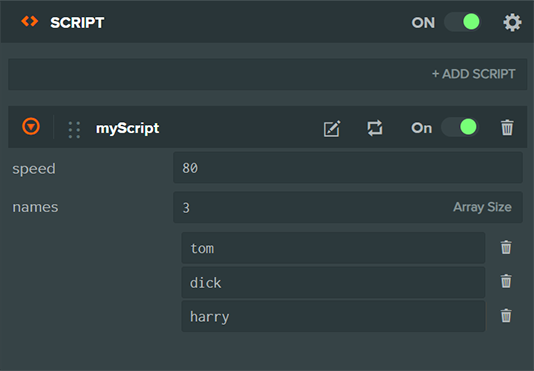
声明属性后,编辑器需要解析代码,才能显示对应控件。属性变化后,需要点击解析按钮手动刷新。

向编辑器暴露属性时,还可以提供额外信息,说明上下文并生成更具体的控件,改善脚本的使用体验。
属性描述
@attribute 注释块的第一句话会作为编辑器中的属性描述,用于说明属性含义和行为。
/**
 * Sets the speed of the Y rotation in degrees.
 *
 * @attribute
 */
speed = 2;
在编辑器中,该描述以悬停提示显示。

属性标题
默认情况下,编辑器以成员名显示属性。可以使用 @title 指定自定义名称:
/**
 * @attribute
 * @title Rotation Speed
 */
speed = 2;
这样编辑器会显示 Rotation Speed,而非 speed。
响应属性变化
在 ESM 脚本中,可以通过 JavaScript getter 和 setter,在属性值变化时执行自定义逻辑,例如更新视觉效果、触发事件或验证数值。
import { Script } from 'playcanvas';

export class Lamp extends Script {
    static scriptName = 'lamp';

    _brightness = 1;

    /**
     * @attribute
     */
    get brightness() {
        return this._brightness;
    }

    set brightness(value) {
        this._brightness = value;
        // Update the light intensity whenever brightness changes
        this.entity.light.intensity = value;
    }
}
下面的例子中,在编辑器或运行时修改 brightness,setter 都会自动更新灯光强度。
@attribute JSDoc 注释块只需在 getter/setter 对之前声明一次。
属性类型
将脚本成员暴露为属性后,编辑器会根据类型显示对应控件,例如数字输入框或布尔复选框。
属性可以是 number、string、boolean、Vec2、Vec3、Vec4、Color、Curve、Asset 或 Entity。
@type 标签
有时无法提前确定属性初始值,例如资源属性未必有默认资源。如果类型已知、数值未知,可以使用 JSDoc @type 标签。
/**
 * @attribute
 * @type {Asset}
 */
myTexture;
属性必须具有初始值,例如 speed = 10,或具有 JSDoc 类型,例如 @type {number}。两者均不存在时,属性会被忽略。
数字类型
数字属性在编辑器中显示数值输入控件:
/** @attribute */
speed = 10;
也可以通过 @range 指定合理范围:
/**
 * @attribute
 * @range [0, 10]
 */
speed = 10;
这会告诉编辑器将数值限制在 0 到 10。
@range 支持两种格式:
@range [min, max]:指定上下限,编辑器显示滑块。@range [min]:仅指定下限,不设上限,编辑器显示没有滑块的数值输入框。
例如,创建必须非负、但没有上限的属性:
/**
 * @attribute
 * @range [0]
 */
positiveValue = 1;

还可以通过其他数值约束,限制编辑器中允许输入的值:
/**
 * @attribute
 * @range [0, 10]
 * @precision 0.1
 * @step 0.05
 */
speed = 10;
字符串类型
字符串属性在编辑器中显示文本输入框:
/** @attribute */
name = 'Player';
还可使用 @placeholder,在字段为空时显示提示文本:
/**
 * @attribute
 * @placeholder Enter player name
 */
name = '';
布尔类型
布尔属性在编辑器中显示复选框:
/** @attribute */
enabled = true;
向量属性
/** @attribute */
position = new Vec3();
必须从 playcanvas 导入 Vec2、Vec3 或 Vec4,才能正确解析对应属性。
向量属性可以是二维、三维或四维。编辑器为每个分量显示独立数值输入框。

颜色属性
/** @attribute */
color = new Color();
必须从 playcanvas 导入 Color,才能正确解析属性。
颜色属性在编辑器中显示拾色器。
曲线属性
/**
 * @attribute
 * @type {Curve}
 * @color rgba
 */
wave;
必须从 playcanvas 导入 Curve,才能正确解析属性。
曲线属性表示一段时间内变化的数值,所有曲线定义在 0.0 到 1.0 区间。可以定义多条曲线,例如通过 curves 为 x、y、z 指定三条曲线,表示 3D 位置。color 属性还提供专门的颜色曲线编辑器。
资源属性
Asset 属性让脚本引用项目资源。
@resource 将编辑器资源选择器限制为指定类型。可用值包括 animation、animstategraph、audio、binary、container、css、cubemap、font、gsplat、html、json、material、model、render、script、shader、sprite、template、text、texture、textureAtlas 和 wasm。
资源属性在运行时的类型为 Asset,可以按下面方式访问其运行时资源:
/**
 * @attribute
 * @type {Asset}
 * @resource texture
 */
texture;

initialize() {
    console.log('This is the texture asset', this.texture);
    console.log('This is the texture resource', this.texture.resource);
}
必须从 playcanvas 导入 Asset,才能正确解析属性。
实体属性
Entity 类型可以引用层级中的其他实体,便于建立实体关联。
/**
 * @attribute
 * @type {Entity}
 */
target;
必须从 playcanvas 导入 Entity,才能正确解析属性。
属性数组
有时需要一起暴露一组属性。例如,某个脚本生成渐变色,你希望用户能够设置任意数量的颜色节点,而非固定起点和终点。这时可在 @type 中使用数组类型。
/**
 * @attribute
 * @type {Color[]}
 */
gradientStops;
Color[] 通过 JSDoc 类型标签声明 gradientStops 是 Color 数组。编辑器据此生成列表控件,让用户设置多个颜色值。
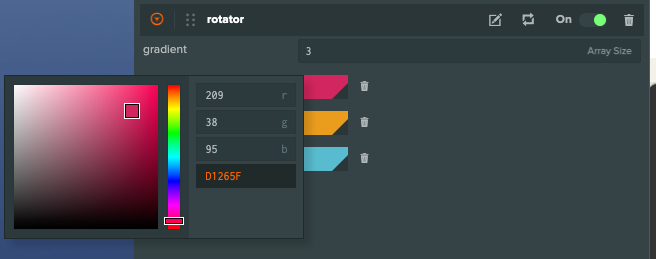
在初始化或更新循环中,可按数组遍历 gradientStops:
initialize() {
    this.gradientStops.forEach(color => {
        console.log('This is a Color class', color);
    });
}
默认数组大小
使用 @size 设置数组属性的初始大小:
/**
 * @attribute
 * @type {Vec3[]}
 * @size 4
 */
waypoints;
此例默认创建四个元素,之后仍可在编辑器中调整大小。
枚举
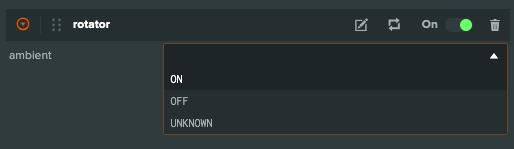
要将属性限制为一组可选值,可以使用 @enum。以枚举作为属性类型后,编辑器会显示仅包含这些选项的下拉框:
/** @enum {number} */
const Lights = {
    ON: 1,
    OFF: 0,
    UNKNOWN: 0.5
};

class MyScript extends Script {
    static scriptName = 'myScript';

    /**
     * @attribute
     * @type {Lights}
     */
    ambient = Lights.OFF;
}
此例使用 Lights 对象作为可选值枚举,@type {Lights} 表示 ambient 只能使用其中的值。编辑器以 Lights 的键作为选项标签(ON/OFF/UNKNOWN),并将对应值赋给 ambient。枚举值只能是数字、字符串或布尔值。
字面量联合类型
简单情况下,可以使用内联字面量联合类型,无需单独定义枚举对象:
/**
 * @attribute
 * @type {'low' | 'medium' | 'high'}
 */
quality = 'medium';

/**
 * @attribute
 * @type {1 | 2 | 3 | 4}
 */
level = 1;
编辑器会创建以下拉指定值为选项的控件。字面量联合类型可以包含字符串、数字或布尔值,但所有值必须属于同一种类型。
条件属性
每个脚本属性都会生成对应编辑器控件。有时需要根据其他属性值隐藏或禁用某些控件。
下面通过例子说明:
export class Delorean extends Script {
    static scriptName = 'delorean';

    /**
     * @attribute
     */
    power = false;

    /**
     * @attribute
     */
    speed = 10;
}
这会为 power 生成复选框,为 speed 生成滑块。如果希望只有 power 开启时才能修改速度,该如何处理?
使用 @enabledif 即可:
export class Delorean extends Script {
    static scriptName = 'delorean';

    /**
     * @attribute
     */
    power = false;

    /**
     * @attribute
     * @enabledif {power}
     */
    speed = 10;
}
现在只有 power 为 true 时,speed 滑块才启用。
基于表达式的条件
也可使用更复杂的条件。当表达式结果为真值时,控件启用。
export class Delorean extends Script {
    static scriptName = 'delorean';

    /**
     * @attribute
     */
    power = false;

    /**
     * @attribute
     * @enabledif {power}
     */
    speed = 10;

    /**
     * @attribute
     * @visibleif {speed > 88.8}
     */
    enableFluxCapacitor = true;
}
在此例中:
- 只有 power 开启时,
speed滑块才启用。 - 只有
speed大于88.8时,enableFluxCapacitor复选框才显示。
这样可以根据脚本状态构建丰富的动态编辑器界面。
实际效果
属性分组
有时希望按逻辑将属性分组。例如 GameLogic 脚本中的敌人具有 speed 和 power,与其分别声明,不如统一放在 enemy 属性下。这可通过属性组实现。
属性组本质上是包含子属性的对象:
class GameLogic extends Script {
    static scriptName = 'gameLogic';

    /**
     * `power` and `speed` are exposed as sub-attributes.
     *
     * @attribute
     */
    enemy = { power: 10, speed: 3 };

    initialize() {
        console.log(this.enemy.speed); // 3
        console.log(this.enemy.power); // 10
    }
}
此例将 enemy 定义为属性组。编辑器会显示 enemy 属性及其可配置的 power、speed 子属性,便于灵活组织相关设置。
属性组让你通过对象结构组织相关属性。
可以通过内联属性组或 typedef 组等不同方式声明。
内联分组
简单的内联声明方式如下:
class GameLogic extends Script {
    static scriptName = 'gameLogic';

    /** @attribute */
    enemy = { power: 10, speed: 3 };
}
Typedef 分组
这种声明方式更模块化。虽然比内联写法更长,但 typedef 可以跨多个脚本和属性复用。
/**
 * @typedef {Object} Enemy
 * @prop {number} speed - The enemy's speed
 * @prop {number} power - The enemy's power
 */

class GameLogic extends Script {
    static scriptName = 'gameLogic';

    /**
     * @attribute
     * @type {Enemy}
     */
    enemy;
}
接口属性
如果既要将属性分组,又要为各成员单独设置约束,可以使用接口属性,它提供更灵活的分组方式。
/** @interface */
class Enemy {
    /**
     * @range [0, 11]
     */
    power = 10;

    speed = 3;
}

class GameLogic extends Script {
    static scriptName = 'gameLogic';

    /**
     * @attribute
     * @type {Enemy}
     */
    enemy;
}
上面的示例创建 Enemy 接口,其 power 成员限制在 0 到 11。同时声明 GameLogic 的 enemy 属性类型为 Enemy。
接口属性既能按逻辑组织属性,也能为单个子属性设置约束,还便于模块化代码。
接口属性规则
使用接口属性需要满足:
- 类声明前必须包含
/** @interface */块注释。 - 脚本属性通过
@type {InterfaceAttribute}引用接口属性类型。 - 接口属性的所有公开成员都会供编辑器使用,无需逐个添加
@attribute。 - 不允许嵌套接口属性。
接口属性数组
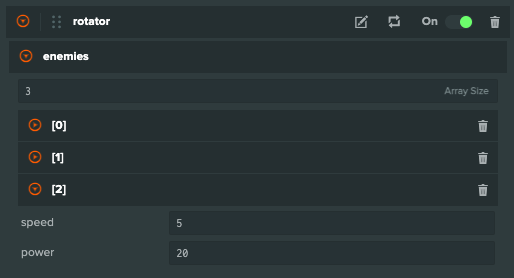
接口属性与普通属性一样,也可以用作数组。例如,GameLogic 可以包含敌人数组,每个敌人都有可独立控制的 power 和 speed。
/** @interface */
class Enemy {
    /**
     * @range [0, 11]
     */
    power = 10;

    speed = 3;
}

class GameLogic extends Script {
    static scriptName = 'gameLogic';

    /**
     * @attribute
     * @type {Enemy[]}
     */
    enemies;

    update(dt) {
        this.enemies.forEach(({ power, speed }) => {
            console.log('This is an enemy', power, speed);
        });
    }
}
Enemy 接口必须在脚本所在文件声明,或被导入该文件。如果 @type 中的类型无法解析,该属性会被忽略,不显示在编辑器中。
编辑器会生成一组 Enemy 控件,每项都有用于子属性的数值输入框。