经典脚本属性参考
本页介绍已弃用的经典脚本系统的脚本属性。
ESM 脚本属性请参阅这里。
脚本属性可以将脚本中的数值暴露到 PlayCanvas 编辑器。只需编写一次代码,就能为不同实体实例调整数值,获得不同属性。特别适合让美术、设计师等非程序成员无需编写代码即可调整配置。
声明脚本属性
在脚本文件顶部按以下格式声明属性:
var MyScript = pc.createScript('myScript');

MyScript.attributes.add('speed', {
    type: 'number',
    default: 80
});
这个例子声明名为 speed 的 number 属性,默认值为 80。
如果需要属性数组,设置 array: true:
var MyScript = pc.createScript('myScript');

MyScript.attributes.add('names', {
    type: 'string',
    array: true
});
让属性显示在编辑器中
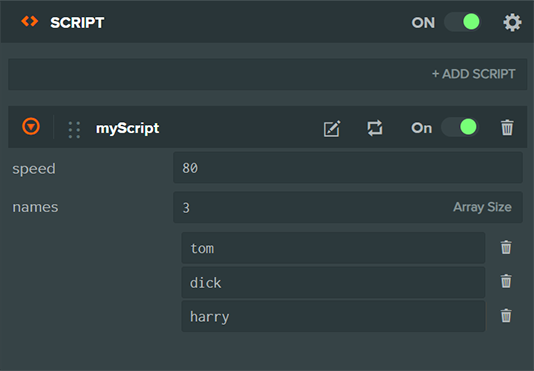
声明属性后,编辑器需要解析代码才能显示属性。属性变化后,需要点击解析按钮手动刷新。

在代码中访问属性
声明的属性会成为脚本实例的成员变量,例如上面的 speed 可以通过 this.speed 访问。
MyScript.prototype.update = function (dt) {
    this.entity.translate(this.speed * dt, 0, 0);
}
响应属性变化
在编辑器中修改属性时,变化会发送到由编辑器启动的所有应用副本,因此无需重新加载就能实时调整。如果需要在属性变化时执行特殊行为,可监听 attr 和 attr:[name]:
MyScript.prototype.initialize = function () {
    // fires only for `speed` attribute
    this.on('attr:speed', function (value, prev) {
        // new value for speed
    });

    // fires for all attribute changes
    this.on('attr', function(name, value, prev) {
        // new attribute value
    });
}
属性类型
声明属性时还需要指定类型,以便编辑器显示合适的控件。boolean、number、string 等类型较直观,部分类型将在下面进一步说明。更多细节见完整属性参考。
实体属性
MyScript.attributes.add('target', { type: 'entity' })
Entity 类型可以引用层级中的另一个实体,便于关联两个实体。
资源属性
MyScript.attributes.add('textures', { type: 'asset', assetType: 'texture', array: true });
Asset 属性让脚本引用项目资源。还支持 assetType,将可选资源限制为 texture、material、model 等指定类型。
资源属性运行时的类型为 pc.Asset,可按如下方式访问其运行时资源:
MyScript.attributes.add('texture', {type: 'asset', assetType: 'texture'});

MyScript.prototype.initialize = function () {
    console.log('This is the texture asset', this.texture);
    console.log('This is the texture resource', this.texture.resource);
};
颜色属性
MyScript.attributes.add('color', { type: 'rgba' });
颜色属性在编辑器中显示拾色器。根据是否需要 alpha 通道,可以选择 rgb 或 rgba。
曲线属性
MyScript.attributes.add('wave', { type: 'curve' }); // one curve
MyScript.attributes.add('wave', { type: 'curve', curves: [ 'x', 'y', 'z' ] }); // three curves: x, y, z
MyScript.attributes.add('wave', { type: 'curve', color: 'r' }); // one curve for red channel
MyScript.attributes.add('wave', { type: 'curve', color: 'rgba' }); // four curves for full color including alpha
曲线属性表示一段时间内变化的值,所有曲线定义在 0.0 到 1.0 区间。可以包含多条曲线,例如通过 curves 为 x、y、z 定义三条曲线,描述 3D 位置。color 属性还提供专门的颜色曲线编辑器。
枚举属性
枚举属性让你从预设选项中选择:
MyScript.attributes.add('value', {
    type: 'number',
    enum: [
        { 'valueOne': 1 },
        { 'valueTwo': 2 },
        { 'valueThree': 3 }
    ]
});
使用 enum 属性声明可选值列表。它是对象数组,每个对象表示一个选项,key 是显示名称,value 是实际属性值。此功能可用于 number、string 等属性类型。
JSON 属性
JSON 属性可以嵌套其他类型的属性。每个 JSON 属性都必须提供 schema 描述内部字段,schema 中使用与上文相同的常规属性定义。例如:
MyScript.attributes.add('gameConfig', {
    type: 'json',
    schema: [{
        name: 'numEnemies',
        type: 'number',
        default: 10
    }, {
        name: 'enemyModels',
        type: 'asset',
        assetType: 'model',
        array: true
    }, {
        name: 'godMode',
        type: 'boolean',
        default: false
    }]
});
也可以声明 JSON 属性数组,创建可编辑对象列表。与其他类型一样,在定义时添加 array: true 即可。
下面展示如何在脚本中访问上述属性:
MyScript.prototype.update = function (dt) {
    if (this.gameConfig.godMode) {
        for (var i = 0; i < this.gameConfig.numEnemies; i++) {
            // ...
        }
    }
};
目前不支持在 JSON 属性中再次定义 JSON 子属性,最多只能嵌套一层。