编辑器 API
注意
编辑器 API 仍处于 Beta 阶段,用于正式项目时请谨慎。
编辑器提供面向用户的 API,可用于自动化任务和扩展基础功能,目前处于 Beta 阶段。
API 尚未稳定,后续开发可能调整,不过预计不会偏离当前设计太多。
编辑器 API 已在 GitHub 开源,API 文档在此。
自动化示例
可以从浏览器开发者工具控制台访问 API,自动化重复任务。下例通过控制台代码查找所有带 red 标签的实体,并将它们禁用。
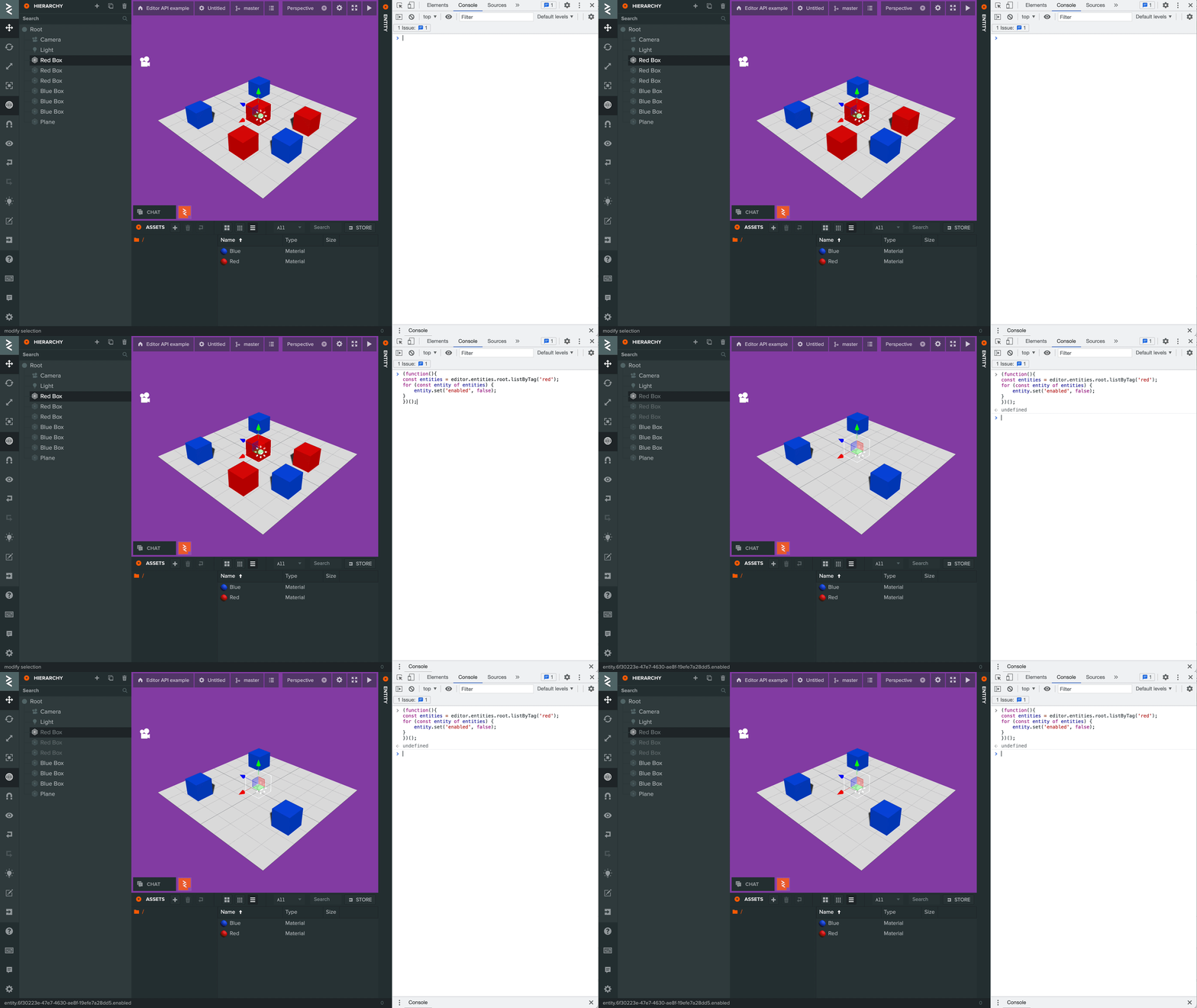
编辑器 API 代码:
(function() {
    const entities = editor.api.globals.entities.root.listByTag('red');
    for (const entity of entities) {
        entity.set('enabled', false);
    }
})();
扩展编辑器功能
可以为编辑器添加功能和自定义界面,例如新按钮。实现方式包括浏览器扩展或用户脚本。
用户脚本通常更容易上手,可以在编辑器基础上运行自定义代码。
下例向视口添加按钮,用于在场景中生成并随机放置方块。
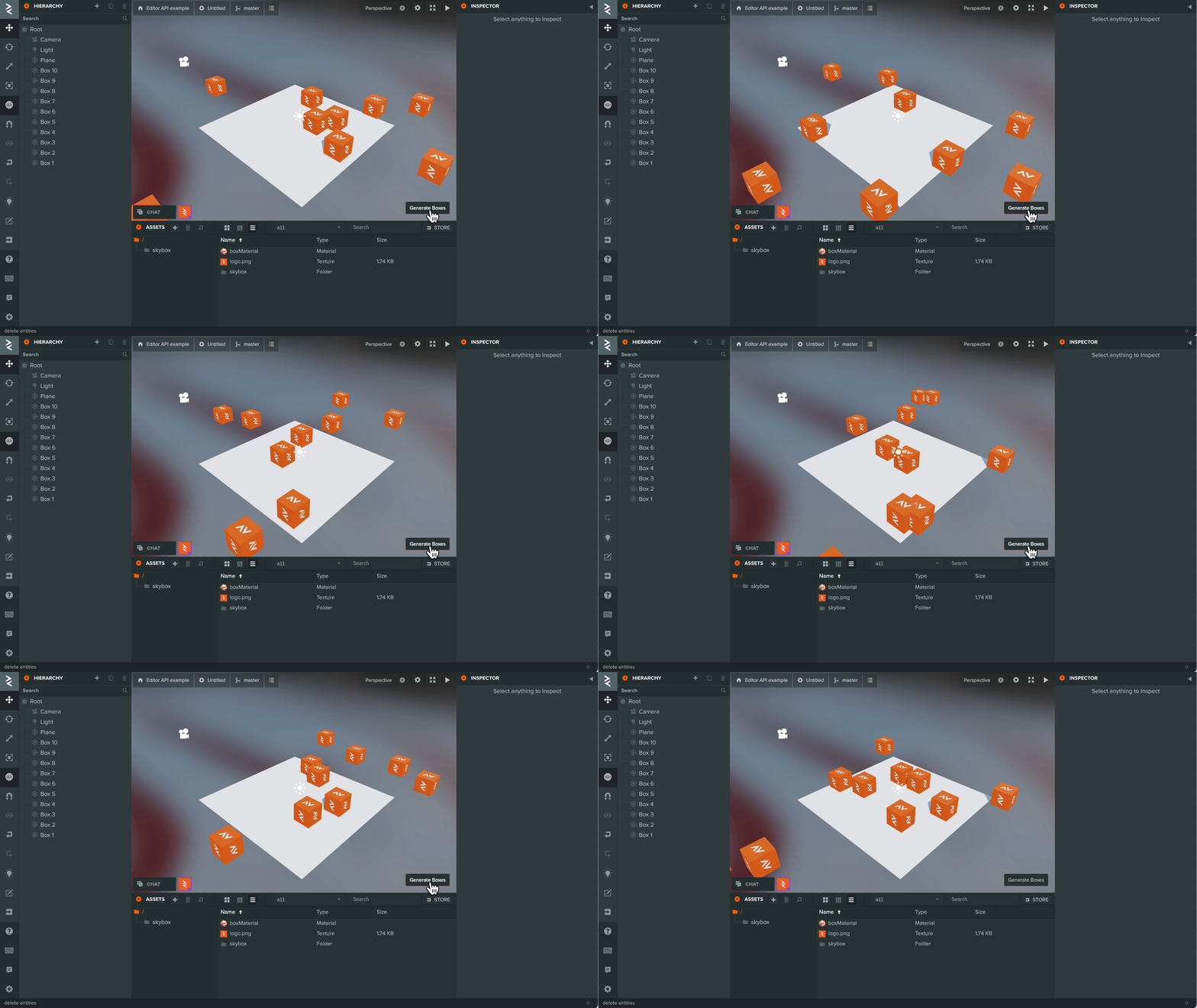
PlayCanvas 团队目前使用开源浏览器扩展 Violentmonkey 管理用户脚本。
安装扩展后,可以便捷地添加自己或其他开发者的脚本,步骤详见 Violentmonkey 文档。
上例用户脚本代码如下:
// ==UserScript==
// @name        Example Script
// @namespace   Violentmonkey Scripts
// @match       https://playcanvas.com/editor/scene/*
// @grant       none
// @version     1.0
// @author      -
// @description 20/10/2021, 11:40:21
// ==/UserScript==

(function() {
    async function generateBoxes(count, position, radius) {
        // create box entity
        const box = editor.api.globals.entities.create({ parent: editor.api.globals.entities.root });
        // find box material asset
        const boxMaterial = editor.api.globals.assets.findOne(asset => asset.get('name') === 'boxMaterial');
        // add render component
        box.addComponent('render', {
            type: 'box',
            materialAssets: [boxMaterial.get('id')]
        });

        // add a number of boxes around a point in the scene
        let offset = new pc.Vec3();
        let rotation = new pc.Quat();
        const result = [];

        for (let i = 0; i < count; i++) {
            const boxCopy = await box.duplicate();
            boxCopy.set('name', 'Box ' + (i + 1));
            offset.set(1, 0, 0);
            rotation.setFromEulerAngles(0, pc.math.random(-360, 360), 0);
            offset = rotation.transformVector(offset);
            offset.scale(pc.math.random(-radius, radius));
            boxCopy.set('position', [position.x + offset.x, position.y + offset.y, position.z + offset.z]);

            result.push(boxCopy);
        }

        // delete original box
        box.delete();

        return result;
    }

    function createButton() {
        const btn = new pcui.Button({ text: 'Generate Boxes' });
        btn.style.position = 'absolute';
        btn.style.bottom = '10px';
        btn.style.right = '10px';
        editor.call('layout.viewport').append(btn);

        let boxes;

        btn.on('click', () => {
            // delete existing boxes
            if (boxes) {
                editor.api.globals.entities.delete(boxes);
                boxes = null;
            }

            generateBoxes(10, new pc.Vec3(), 10).then(result => {
                boxes = result;
            });
        });
    }

    // Wait until the Editor is available before adding the button
    editor.once('load', () => createButton());
})();
下面说明脚本的关键部分:
顶部是脚本信息头,便于分享给其他用户。关键的 @match 属性决定在哪些 URL 加载脚本,此处匹配所有 PlayCanvas 场景。修改方式详见 Violentmonkey 文档。
// ==UserScript==
// @name        Example Script
// @namespace   Violentmonkey Scripts
// @match       https://playcanvas.com/editor/scene/*
// @grant       none
// @version     1.0
// @author      -
// @description 20/10/2021, 11:40:21
// ==/UserScript==
这里使用私有编辑器 API 等待编辑器完整加载的事件,确保扩展功能的代码执行前,编辑器 API 已经可用。
    // Wait until the Editor is available before adding the button
    editor.once('load', () => createButton());
按钮来自编辑器自身使用的 PCUI 框架。示例还通过私有 API 获取视口 DOM,以便挂载按钮。
    function createButton() {
        const btn = new pcui.Button({ text: 'Generate Boxes' });
        btn.style.position = 'absolute';
        btn.style.bottom = '10px';
        btn.style.right = '10px';
        editor.call('layout.viewport').append(btn);

        let boxes;

        btn.on('click', () => {
            // delete existing boxes
            if (boxes) {
                editor.api.globals.entities.delete(boxes);
                boxes = null;
            }

            generateBoxes(10, new pc.Vec3(), 10).then(result => {
                boxes = result;
            });
        });
    }