动画事件
动画事件用名称标记片段中的一个时刻。anim 播放经过该时间时发出事件,执行监听器。可用于脚落地时的声音、尘土、攻击造成伤害的帧,或片段结束后触发其他行为,使逻辑与动画同步。
添加事件
事件属于片段,因此所有播放该片段的 anim 都会触发。事件包含从片段起点计算的秒数 time、name,以及希望传给监听器的其他属性。
- 引擎
- 编辑器
- React
- Web Components
将片段的 events 设为包含全部事件的 AnimEvents,列表顺序不限:
walkTrack.events = new pc.AnimEvents([
    { time: 0.2, name: 'footstep', foot: 'left' },
    { time: 0.7, name: 'footstep', foot: 'right' }
]);
这会替换片段原有事件。
在资源面板选中动画资源,点击 Inspector EVENTS 中的 + EVENT,设置:
| 字段 | 说明 |
|---|---|
| time | 触发时间,从片段起点计,单位秒。 |
| name | 监听器使用的事件名。 |
| number | 以 number 属性传给监听器的数值。 |
| string | 以 string 属性传给监听器的字符串。 |
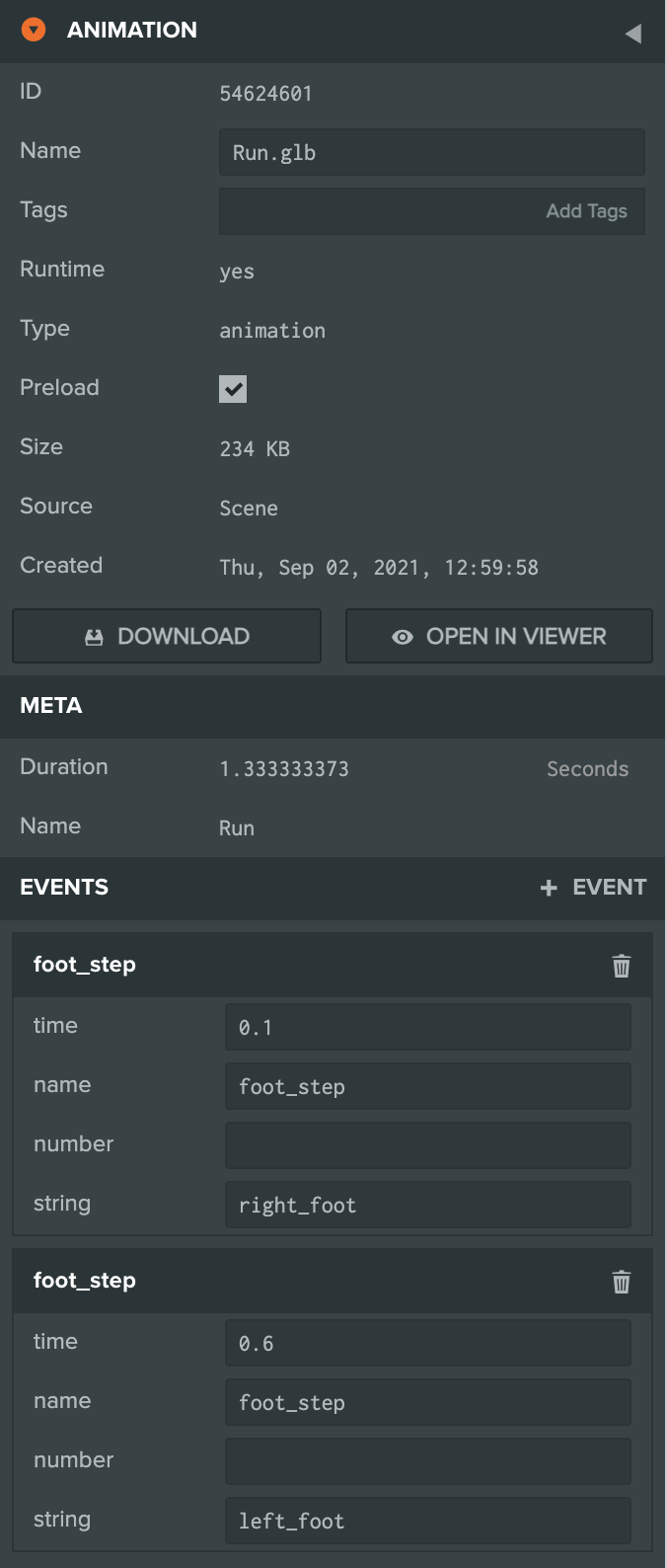
模型加载后,像引擎标签页一样给片段设置事件:
import { useEffect } from 'react';
import { AnimEvents } from 'playcanvas';
import { useModel } from '@playcanvas/react/hooks';

const { asset } = useModel('character.glb');

useEffect(() => {
  if (!asset) return;
  const walk = asset.resource.animations.find(animation => animation.resource.name === 'walk').resource;
  walk.events = new AnimEvents([
    { time: 0.2, name: 'footstep', foot: 'left' },
    { time: 0.7, name: 'footstep', foot: 'right' }
  ]);
}, [asset]);
像引擎标签页一样操作片段。<pc-model> 就绪时,使用的 <pc-asset> 已加载,可从其 asset 获取片段:
import { AnimEvents } from 'playcanvas';
import { whenReady } from '@playcanvas/web-components';

await whenReady('pc-model[name="character"]');
const container = document.getElementById('character').asset.resource;
const walk = container.animations.find(animation => animation.resource.name === 'walk').resource;
walk.events = new AnimEvents([
    { time: 0.2, name: 'footstep', foot: 'left' },
    { time: 0.7, name: 'footstep', foot: 'right' }
]);
监听事件
anim 以事件名称触发,并传入包含 name、time、所属 track 和其他自定义属性的对象,例如编辑器中的 number、string。
- 引擎
- 编辑器
- React
- Web Components
character.anim.on('footstep', (event) => {
    console.log(`${event.foot} foot down at ${event.time} s of ${event.track.name}`);
});
在具有 Anim 组件的实体脚本中监听:
import { Script } from 'playcanvas';

export class Footsteps extends Script {
    static scriptName = 'footsteps';

    initialize() {
        this.entity.anim.on('foot_step', (event) => {
            // the event's string field names the foot that landed
            const foot = this.entity.findByName(event.string);
            this.app.fire('dust', foot.getPosition());
        });
    }
}
在模型 <Entity> 内、<Anim playing /> 之后放置组件,挂载后监听,卸载时取消:
function Footsteps({ onFootstep }) {
  const entity = useParent();

  useEffect(() => {
    entity.anim.on('footstep', onFootstep);
    return () => entity.anim.off('footstep', onFootstep);
  }, [entity, onFootstep]);

  return null;
}
在 <pc-anim> 对应的 anim 组件上监听:
const anim = await whenReady('pc-anim');
anim.component.on('footstep', (event) => {
    console.log(`${event.foot} foot down`);
});
事件触发时机
播放经过事件时间的那一帧触发:
- **每次循环。**循环片段每轮重新触发。
- **片段末尾。**事件时间等于时长时,到达末尾即触发,即使不循环,也可用于检测播放完成。
- **任意速度。**加速、减速和倒放均可触发。
- **每个图层。**各图层都会触发所播放片段事件,即使权重为 0。两层播放具有同名事件的片段,会触发两次。
- **交叉淡化期间。**退出状态继续播放,直到过渡结束,因此事件也继续触发。
AI
特效跨多个动画时,可让 AI 助手通过**编辑器 MCP 服务器**核对事件名、参数和脚本监听器,再在 Launcher 中重现,排查遗漏或时机错误。
示例
下面的引擎应用循环播放机械臂 pick,并添加夹爪闭合和重新张开的事件。监听器在闭合期间让夹爪发光,并显示最近事件。
import * as pc from 'playcanvas';

// create the application with the component systems and resource handlers it uses
const canvas = document.getElementById('application');
const device = await pc.createGraphicsDevice(canvas, {
    deviceTypes: [pc.DEVICETYPE_WEBGPU]
});
device.maxPixelRatio = Math.min(window.devicePixelRatio, 2);

const options = new pc.AppOptions();
options.graphicsDevice = device;
options.componentSystems = [
    pc.RenderComponentSystem,
    pc.CameraComponentSystem,
    pc.LightComponentSystem,
    pc.AnimComponentSystem
];
options.resourceHandlers = [pc.ContainerHandler, pc.TextureHandler];

const app = new pc.AppBase(canvas);
app.init(options);
app.setCanvasFillMode(pc.FILLMODE_FILL_WINDOW);
app.setCanvasResolution(pc.RESOLUTION_AUTO);
window.addEventListener('resize', () => app.resizeCanvas());
app.start();

app.scene.ambientLight = new pc.Color(0.35, 0.35, 0.4);

// load the robot arm, a GLB with five animations
const asset = new pc.Asset('robot-arm', 'container', {
    url: 'https://developer.playcanvas.com/assets/robot-arm.glb'
});
await new Promise((resolve) => {
    asset.ready(resolve);
    app.assets.add(asset);
    app.assets.load(asset);
});

const camera = new pc.Entity('camera');
camera.addComponent('camera', {
    clearColor: new pc.Color(0.11, 0.12, 0.17)
});
camera.setPosition(1.75, 1.4, 2.15);
camera.lookAt(0, 0.75, 0);
app.root.addChild(camera);

const light = new pc.Entity('light');
light.addComponent('light', {
    castShadows: true,
    shadowBias: 0.2,
    normalOffsetBias: 0.05
});
light.setEulerAngles(48, 38, 0);
app.root.addChild(light);

const floor = new pc.Entity('floor');
const floorMaterial = new pc.StandardMaterial();
floorMaterial.diffuse = new pc.Color(0.24, 0.26, 0.31);
floorMaterial.update();
floor.addComponent('render', { type: 'plane', material: floorMaterial });
floor.setLocalScale(20, 1, 20);
app.root.addChild(floor);

// create the arm's entities, and give its root an anim component
const arm = asset.resource.instantiateRenderEntity({ castShadows: true });
arm.addComponent('anim', { activate: true });
app.root.addChild(arm);

// give the gripper's jaws a material of their own, which the events make glow while they are closed
const jaws = ['arm_jaw_l', 'arm_jaw_r'].flatMap(name => arm.findByName(name).render.meshInstances);
const jawMaterial = jaws[0].material.clone();
jaws.forEach((meshInstance) => {
    meshInstance.material = jawMaterial;
});

// add two events to the pick clip: the jaws are closed at 2.3 seconds, and open again at 4.6
const pick = asset.resource.animations.find(animation => animation.resource.name === 'pick').resource;
pick.events = new pc.AnimEvents([
    { time: 2.3, name: 'jaws', string: 'closed' },
    { time: 4.6, name: 'jaws', string: 'open' }
]);
arm.anim.assignAnimation('Pick', pick);

// the anim component fires each event as it plays past it, on every loop
const label = document.createElement('div');
label.style.cssText = 'position: absolute; left: 12px; bottom: 10px; color: #ccc; font: 14px sans-serif;';
label.textContent = 'Waiting for an event...';
document.body.appendChild(label);
arm.anim.on('jaws', (event) => {
    jawMaterial.emissive = event.string === 'closed' ? new pc.Color(0.2, 1, 0.3) : pc.Color.BLACK;
    jawMaterial.update();
    label.textContent = `Event: ${event.name}, ${event.string}, at ${event.time} seconds into ${event.track.name}`;
});
可以尝试:
- 将
closed事件移到1.9秒,即夹爪开始闭合时。 - 添加
{ time: 0, name: 'jaws', string: 'open' },每轮开始都会触发。 - 使用
arm.anim.assignAnimation('Pick', pick, undefined, -1);倒放。事件顺序反转,夹爪张开时发光。
动画事件
另请参阅
- 动画片段:事件所属的片段。
- 动画资源:编辑器检查器。
- AnimEvents 和 AnimComponent:引擎 API。