力与冲量
使用方向键施加冲量,使用 WASD 键施加力矩以旋转立方体。按住 F 键施加持续向上的力,以抵消重力。 按 R 键重置立方体。
试着让立方体在一个顶角上保持平衡并旋转! 完整代码位于页面底部。
本教程将演示如何使用力控制动态刚体,实现上面的效果。我们将简要介绍力、冲量、力矩,以及如何在刚体组件界面中自定义行为。
通过脚本施力
施加恒力
if (app.keyboard.isPressed(pc.KEY_F) ) {
    this.entity.rigidbody.applyForce(0, 9.8, 0);
}
用户按 F 键时,通过 applyForce(x, y, z) 向目标实体施加沿全局 Y 轴的力。还可以指定力矢量的作用点。
冲量
if (app.keyboard.isPressed(pc.KEY_LEFT) ) {
    this.entity.rigidbody.applyImpulse(-1, 0, 0);
}
通过 applyImpulse(x, y, z) 向立方体施加沿 X 轴的冲量,使速度瞬间改变。
力矩
if (app.keyboard.isPressed(pc.KEY_W) ) {
    this.entity.rigidbody.applyTorque(-this.torque, 0, 0);
}
通过 applyTorque(x, y, z) 向实体施加力矩,即产生旋转的力。
角冲量
this.entity.rigidbody.applyTorqueImpulse(x, y, z)
通过 applyTorqueImpulse(x, y, z) 瞬间改变角速度。上面的演示代码未使用此方法。
移动动态刚体
移动刚体时,应使用上述方法施加线性力和旋转力(力矩)。通常应避免直接修改刚体的位置或速度,因为这会覆盖物理模拟,尤其在发生碰撞时可能产生异常效果。
不过,如有需要,可以将新的 pc.Vec3 值直接赋给 entity.rigidbody.linearVelocity 或 entity.rigidbody.angularVelocity,覆盖速度。
有关刚体类型的更多信息,请参阅碰撞 API、pc 命名空间、第一人称控制器教程和碰撞教程。
基本配置
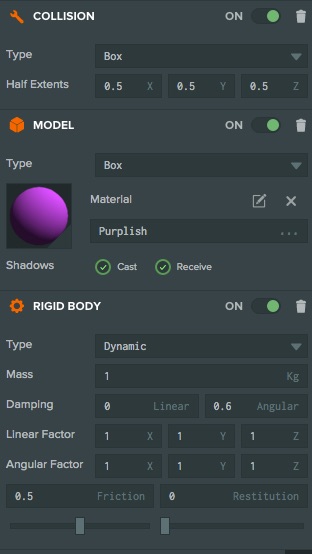
创建包含聚光灯、立方体和地面的基本场景。立方体实体具有模型、刚体、碰撞和脚本组件,地面具有模型、刚体和碰撞组件。立方体刚体设为动态,地面刚体设为静态。为每个箱体创建材质并调整漫反射颜色,使画面更易辨认,同时为 SpotLight 和 DynamicBody 实体启用 Cast Shadows(投射阴影)。完整的 usingForces 场景和代码见此 PlayCanvas 应用。
限制与控制
我们在编辑器中进行了一些设置,防止不平衡力持续作用导致刚体不断加速而失控。立方体启用了角阻尼,立方体和地面都设置了摩擦力。这里未使用线性阻尼,但它可以模拟空气阻力;也可以根据需要通过代码施加减速。
传送刚体
要将刚体瞬间传送到新位置,不能使用 pc.Entity API 的 setPosition 函数,因为物理引擎仍会认为刚体位于原处。应改用刚体组件的 teleport 函数:
//code within the update function
this.playerPos = this.entity.getLocalPosition();

// Keeping the cube on screen - cube moves off of one screen edge then appears from the opposite edge.
if (this.playerPos.x < -9.0) {
    this.entity.rigidbody.teleport(8.8, this.playerPos.y, this.playerPos.z);
}
if (this.playerPos.x > 9.0) {
    this.entity.rigidbody.teleport(-8.8, this.playerPos.y, this.playerPos.z);
}
当立方体在 X 方向超出可见区域时,会调用 teleport 将其传送到屏幕另一侧。目标位置会稍微靠内,避免连续触发 if() 语句。
重置立方体的代码
if (app.keyboard.wasPressed(pc.KEY_R)) {
    this.reset();
}
reset: function () {
    this.entity.rigidbody.teleport(0, 2, 0);
    this.entity.rigidbody.linearVelocity = pc.Vec3.ZERO;
    this.entity.rigidbody.angularVelocity = pc.Vec3.ZERO;
}
我们提供了重置函数,将立方体移回初始位置,并按上述方法同步刚体与传送后实体的位置。函数最后两行将刚体的线速度和角速度归零。也可以重置对象朝向,但此代码未执行该操作。
完整代码
- ESM
- 传统脚本
import {
    Script, Vec3,
    EVENT_KEYDOWN, KEY_LEFT, KEY_RIGHT, KEY_UP, KEY_A, KEY_D, KEY_W, KEY_S, KEY_F, KEY_R
} from 'playcanvas';

export class Movement extends Script {
    static scriptName = "movement";

    // initialize code called once per entity
    initialize() {
        this.torque = 7;
        this.app.keyboard.on(EVENT_KEYDOWN, this.onKeyDown, this);

        this.on('destroy', function() {
            this.app.keyboard.off(EVENT_KEYDOWN, this.onKeyDown, this);
        }, this);
    }

    onKeyDown(event) {
        event.event.preventDefault();
    }

    // update code called every frame
    update(dt) {
        //update player's position
        this.playerPos = this.entity.getLocalPosition();

        const app = this.app;

        //keyboard controls and applying forces and moments.
        if (app.keyboard.isPressed(KEY_LEFT) ) {
            this.entity.rigidbody.applyImpulse(-1, 0, 0);
        }
        if (app.keyboard.isPressed(KEY_RIGHT) ) {
            this.entity.rigidbody.applyImpulse(1, 0, 0);
        }
        if (app.keyboard.isPressed(KEY_UP) ) {
            this.entity.rigidbody.applyImpulse(0, 1, 0);
        }
        if (app.keyboard.isPressed(KEY_A) ) {
            this.entity.rigidbody.applyTorque(0, this.torque, 0);
        }
        if (app.keyboard.isPressed(KEY_D) ) {
            this.entity.rigidbody.applyTorque(0, -this.torque, 0);
        }
        if (app.keyboard.isPressed(KEY_W) ) {
            this.entity.rigidbody.applyTorque(-this.torque, 0, 0);
        }
        if (app.keyboard.isPressed(KEY_S) ) {
            this.entity.rigidbody.applyTorque(this.torque, 0, 0);
        }
        if (app.keyboard.isPressed(KEY_F) ) {
            this.entity.rigidbody.applyForce(0, 9.8, 0);
        }

        // Keeping the cube on screen - cube moves off of one screen edge then appears from the opposite edge.
        if (this.playerPos.x < -9.0) {
            this.entity.rigidbody.teleport(8.8, this.playerPos.y, this.playerPos.z);
        }
        if (this.playerPos.x > 9.0) {
            this.entity.rigidbody.teleport(-8.8, this.playerPos.y, this.playerPos.z);
        }

        // cube reset control
        if (app.keyboard.wasPressed(KEY_R) ) {
            this.reset();
        }
    }

    reset() {
        this.entity.rigidbody.teleport(0, 2, 0);
        this.entity.rigidbody.linearVelocity = Vec3.ZERO;
        this.entity.rigidbody.angularVelocity = Vec3.ZERO;
    }
}
var DynamicBody = pc.createScript('dynamicBody');

// initialize code called once per entity
DynamicBody.prototype.initialize = function() {
    this.torque = 7;
    this.app.keyboard.on(pc.EVENT_KEYDOWN, this.onKeyDown, this);

    this.on('destroy', function() {
        this.app.keyboard.off(pc.EVENT_KEYDOWN, this.onKeyDown, this);
    }, this);
};

DynamicBody.prototype.onKeyDown = function (event) {
    event.event.preventDefault();
};

// update code called every frame
DynamicBody.prototype.update = function(dt) {
    //update player's position
    this.playerPos = this.entity.getLocalPosition();

    var app = this.app;

    //keyboard controls and applying forces and moments.
    if (app.keyboard.isPressed(pc.KEY_LEFT) ) {
        this.entity.rigidbody.applyImpulse(-1, 0, 0);
    }
    if (app.keyboard.isPressed(pc.KEY_RIGHT) ) {
        this.entity.rigidbody.applyImpulse(1, 0, 0);
    }
    if (app.keyboard.isPressed(pc.KEY_UP) ) {
        this.entity.rigidbody.applyImpulse(0, 1, 0);
    }
    if (app.keyboard.isPressed(pc.KEY_A) ) {
        this.entity.rigidbody.applyTorque(0, this.torque, 0);
    }
    if (app.keyboard.isPressed(pc.KEY_D) ) {
        this.entity.rigidbody.applyTorque(0, -this.torque, 0);
    }
    if (app.keyboard.isPressed(pc.KEY_W) ) {
        this.entity.rigidbody.applyTorque(-this.torque, 0, 0);
    }
    if (app.keyboard.isPressed(pc.KEY_S) ) {
        this.entity.rigidbody.applyTorque(this.torque, 0, 0);
    }
    if (app.keyboard.isPressed(pc.KEY_F) ) {
        this.entity.rigidbody.applyForce(0, 9.8, 0);
    }

    // Keeping the cube on screen - cube moves off of one screen edge then appears from the opposite edge.
    if (this.playerPos.x < -9.0) {
        this.entity.rigidbody.teleport(8.8, this.playerPos.y, this.playerPos.z);
    }
    if (this.playerPos.x > 9.0) {
        this.entity.rigidbody.teleport(-8.8, this.playerPos.y, this.playerPos.z);
    }

    // cube reset control
    if (app.keyboard.wasPressed(pc.KEY_R) ) {
        this.reset();
    }
};

DynamicBody.prototype.reset = function () {
    this.entity.rigidbody.teleport(0, 2, 0);
    this.entity.rigidbody.linearVelocity = pc.Vec3.ZERO;
    this.entity.rigidbody.angularVelocity = pc.Vec3.ZERO;
};