用户界面:排行榜
使用 Element 组件制作的排行榜。查看完整场景。
本教程演示如何使用内置 Element 创建简单排行榜,并通过程序从 JSON 资源填充数据。
层级
界面层级如下:
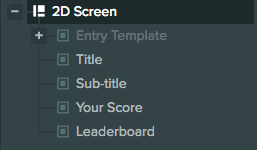
这里有一个二维 Screen、两个用于标题与副标题的元素,以及两个作为排行榜数据背景和面板的 Image 元素。Your Score 下显示玩家自己的排名,Leaderboard 下显示其他条目。
此外还有一个禁用的实体 Entry Template,作为每一行的模板。我们会为 JSON 资源中的每个排行榜条目克隆该模板,再将克隆添加到对应面板。
屏幕配置
屏幕配置如下:
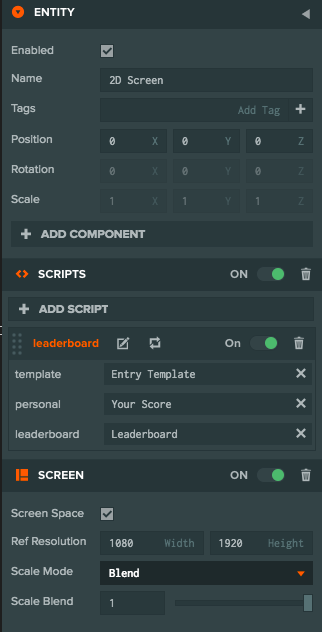
由于这是二维屏幕,我们勾选 Screen Space(屏幕空间)。Reference Resolution(参考分辨率)设为目标分辨率,本例为 1080 × 1920。Scale Mode(缩放模式)选择 Blend,使屏幕适应分辨率变化;Scale Blend(缩放混合)设为 1,使屏幕只根据高度变化缩放。
屏幕实体还具有脚本组件,其中包含下文介绍的 leaderboard 脚本。
面板配置
每个面板使用 Image 元素显示背景。我们将在面板下通过程序添加 Entry Template 的克隆。面板锚定在屏幕中央。
条目模板配置
排行榜每行模板的层级如下:
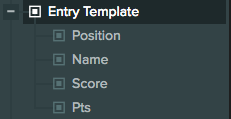
模板具有四个 Text 元素子级,分别显示排行榜名次、玩家名称、分数和 PTS 标签。
Entry Template 本身是 Group 元素:
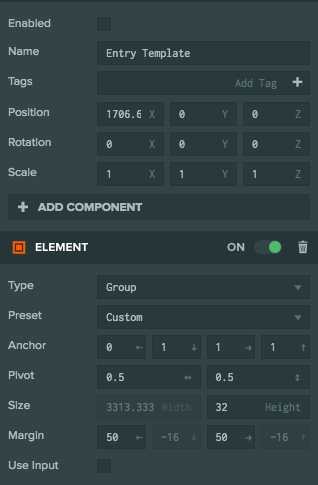
注意,Group 元素采用分离的水平锚点:
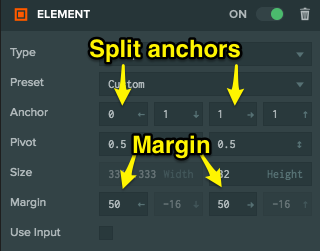
两个水平锚点不同,分别为 0 和 1,因此 Screen 改变尺寸时,元素会自动扩展以填满水平区域。我们还设置了 50 像素的水平边距,使元素与边缘保持少许间隔;只有锚点分离时才能设置边距。
下面看看 Group 的其他子级。
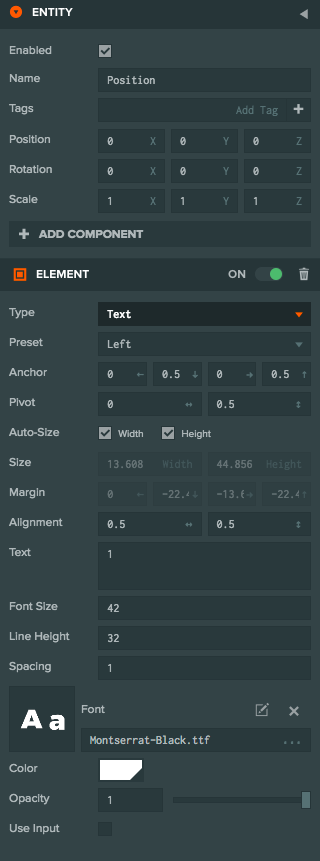
名次
名次锚定在左侧:
名称
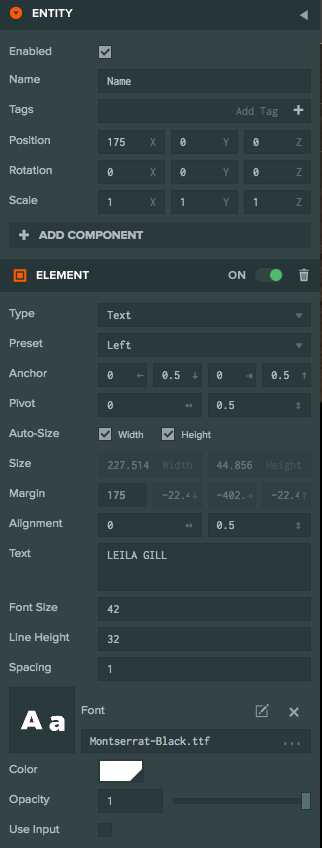
名称锚定在左侧,并向右移动少许:
分数
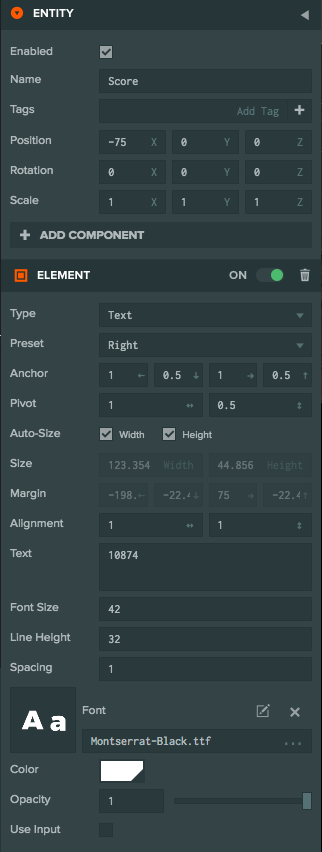
分数锚定在右侧:
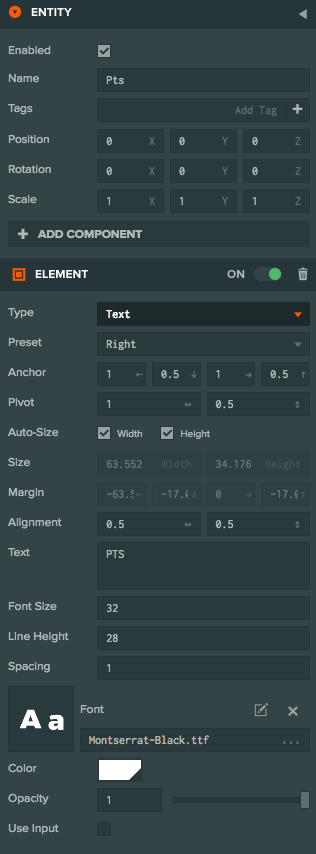
分数标签
分数标签锚定在右侧:
脚本
下面的 leaderboard 脚本读取 JSON 资源并填充排行榜:
- ESM
- 传统脚本
import { Script } from 'playcanvas';

export class Leaderboard extends Script {
    static scriptName = "leaderBoard";

    /**
     * @attribute
     * @title Template
     * @type {Entity}
     */
    template = null;

    /**
     * @attribute
     * @title Personal
     * @type {Entity}
     */
    personal = null;

    /**
     * @attribute
     * @title Leaderboard
     * @type {Entity}
     */
    leaderboard = null;

    initialize() {
        this.entries = [];

        this.load((data) => {
            this.clear();

            // add the personal entry
            let y = -75;
            this.addEntry(this.personal, y, data.personal.position, data.personal.name, data.personal.score);

            // add the top ten
            y = -60;
            for (let i = 0; i < Math.min(data.leaderboard.length, 10); i++) {
                this.addEntry(this.leaderboard, y, i + 1, data.leaderboard[i].name, data.leaderboard[i].score);
                y -= 99; // offset each entry
            }
        });
    }

    clear() {
        this.entries.forEach(entry => entry.destroy());
        this.entries = [];
    }

    addEntry(parent, y, position, name, score) {
        const entry = this.template.clone();
        entry.enabled = true;

        entry.findByName("Position").element.text = position.toString();
        entry.findByName("Name").element.text = name.toUpperCase();
        entry.findByName("Score").element.text = score.toString();

        this.entries.push(entry);

        parent.addChild(entry);
        entry.translateLocal(0, y, 0);
    }

    load(callback) {
        const asset = this.app.assets.find("leaderboard-data.json");
        asset.ready(() => {
            callback(asset.resource);
        });
        this.app.assets.load(asset);
    }
}
var Leaderboard = pc.createScript('leaderboard');

// the text entry template to clone
Leaderboard.attributes.add("template", {type: "entity"});
// the parent leaderboard for the personal score
Leaderboard.attributes.add("personal", {type: "entity"});
// the parent leaderboard for the top ten
Leaderboard.attributes.add("leaderboard", {type: "entity"});

Leaderboard.prototype.initialize = function() {
    var self = this;

    this.entries = [];

    this.load(function (data) {
        self.clear();

        // add the personal entry
        var y = -75;
        self.addEntry(self.personal, y, data.personal.position, data.personal.name, data.personal.score);

        // add the top ten
        y = -60;
        for (var i = 0; i < Math.min(data.leaderboard.length, 10); i++) {
            self.addEntry(self.leaderboard, y, i+1, data.leaderboard[i].name, data.leaderboard[i].score);
            y -= 99; // offset each entry
        }
    });
};

// clear all leaderboard entries
Leaderboard.prototype.clear = function () {
    for (var i = 0; i < this.entries.length; i++) {
        this.entries[i].destroy();
    }

    this.entries = [];
};

// add a new entry into the leaderboard
Leaderboard.prototype.addEntry = function (parent, y, position, name, score) {
    var entry = this.template.clone();
    entry.enabled = true;

    entry.findByName("Position").element.text = position.toString();
    entry.findByName("Name").element.text = name.toUpperCase();
    entry.findByName("Score").element.text = score.toString();

    this.entries.push(entry);

    parent.addChild(entry);
    entry.translateLocal(0, y, 0);
};

// Mock loading leaderboard data, for this demo we just get the data from a JSON file in the project
// For your project you could download this from a server backend
Leaderboard.prototype.load = function (callback) {
    var asset = this.app.assets.find("leaderboard-data.json");
    asset.ready(function () {
        callback(asset.resource);
    });
    this.app.assets.load(asset);
};