实时多人联机
使用 WASD 移动玩家。如果只看到一个胶囊体,请在另一个标签页或另一台电脑上打开此页面。
本教程使用 Node.js 和 Socket.io 配置基础多人项目,重点介绍 PlayCanvas 端的实现。完成后,你将得到与上方类似的项目。教程项目在此。
配置服务器
我们采用客户端—服务器模型。服务器接收所有客户端,即 PlayCanvas 实例的数据,再广播回各客户端。
原教程使用 Glitch 在浏览器中编写和部署免费的后端应用,并建议创建账户以便找回项目。其操作流程是创建 Node 应用,将 server.js 替换为以下内容:
const http = require('http');
const { Server } = require('socket.io');

const server = http.createServer();

// Configure Socket.IO with CORS
const io = new Server(server, {
    cors: {
        // If you only want to allow PlayCanvas launch domain:
        // origin: "https://launch.playcanvas.com",

        // Or allow all origins (less secure, but quick for testing)
        origin: "*",
        methods: ["GET", "POST"]
    }
});

io.on('connection', (socket) => {
    console.log(`New client connected: ${socket.id}`);
});

const PORT = process.env.PORT || 3000;
server.listen(PORT, () => {
    console.log(`Server started on port ${PORT}`);
});
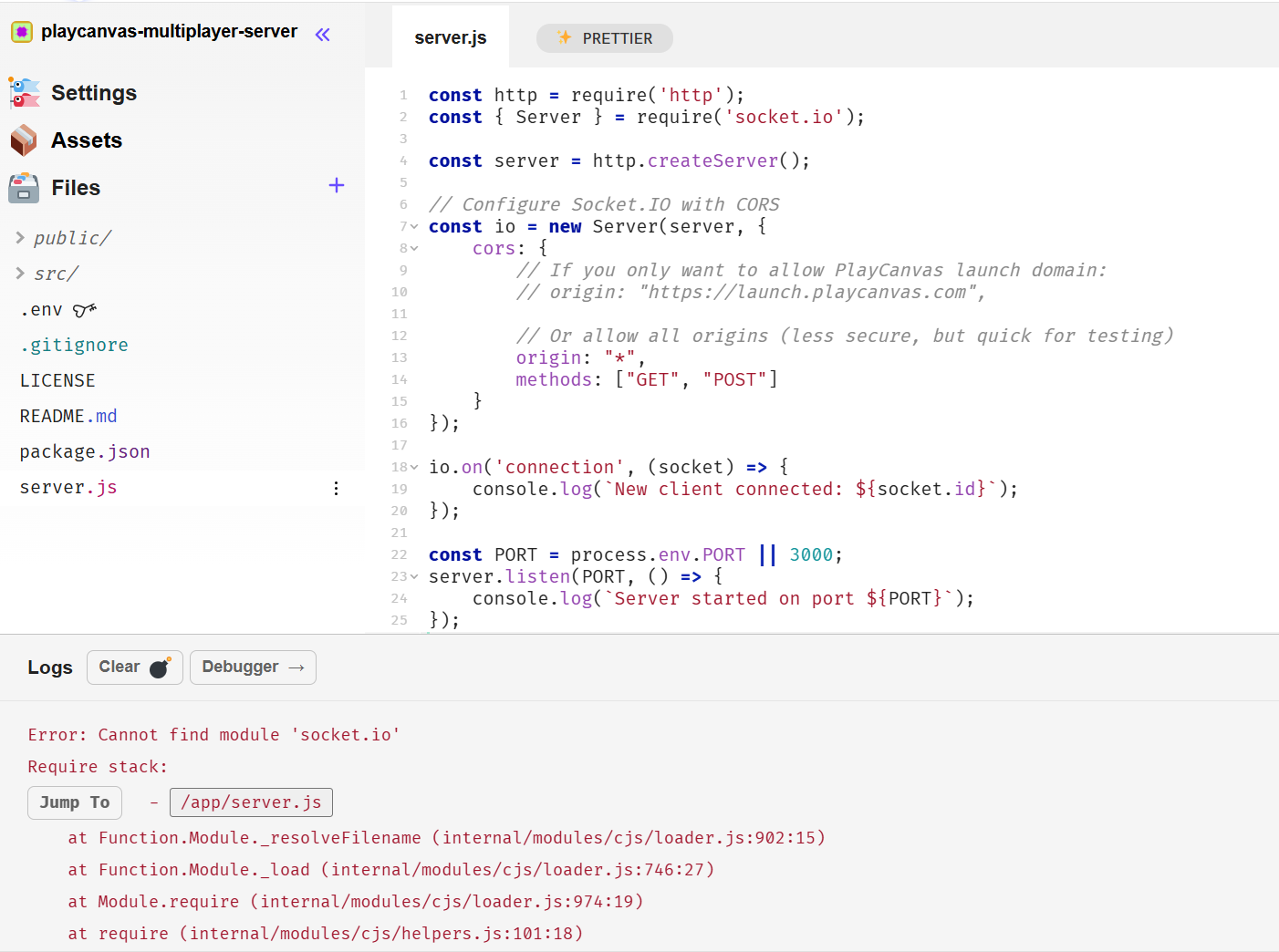
按照原教程的 Glitch 工作流,每次编辑完成后服务器自动重新运行。复制代码后会报错,点击窗口底部的 Logs(日志)打开服务器控制台,可看到输出与 Error: Cannot find module 'socket.io' 错误。
要添加依赖包,打开 package.json,点击顶部 Add Package(添加包),搜索 socket.io。
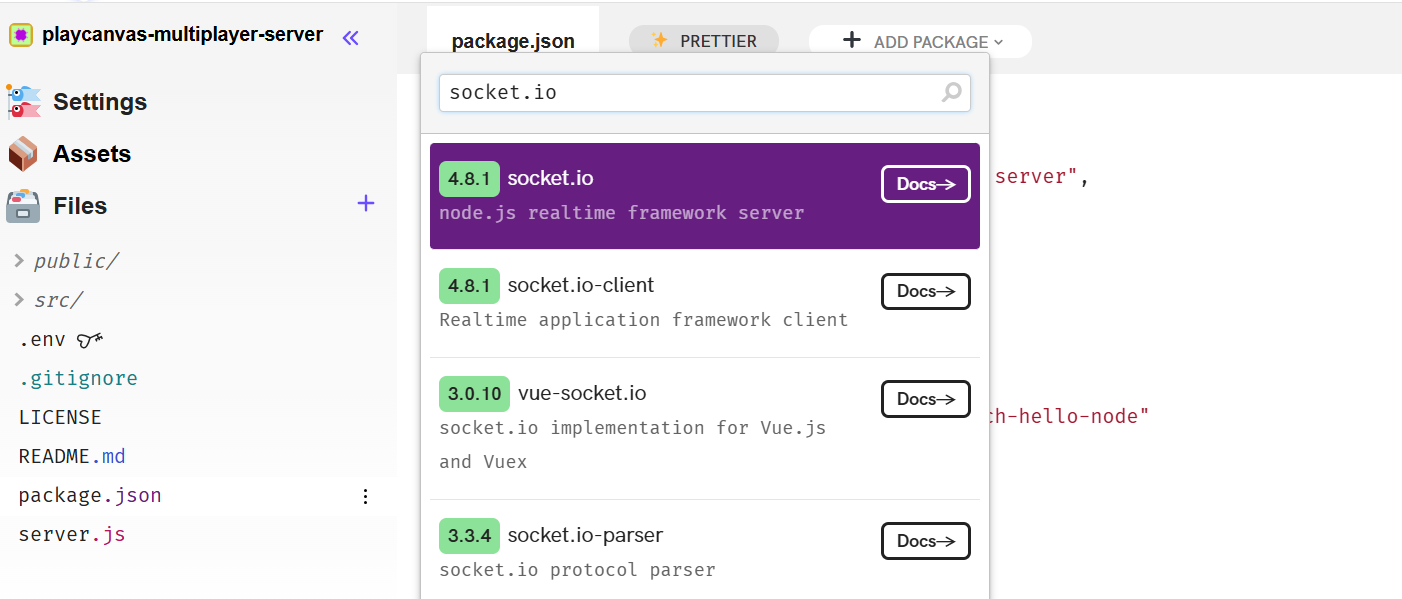
安装完成后,服务器自动重启,日志应显示 Server started on port 3000,说明服务器已成功启动。
点击左侧 Settings 可查看服务器部署域名,也可在此重命名项目。
此服务器只在有人连接时记录消息,足以让我们开始编写客户端并确认连接正常。
配置项目
在 PlayCanvas 新建项目。首先以外部脚本形式引入 Socket.io 客户端 JavaScript 库,打开项目设置:
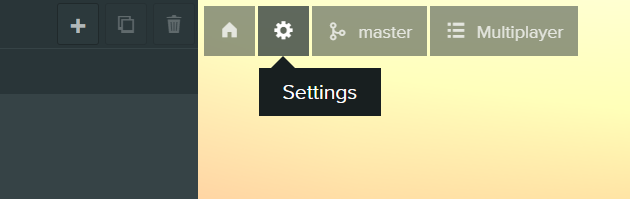
找到并打开 External Scripts(外部脚本)。
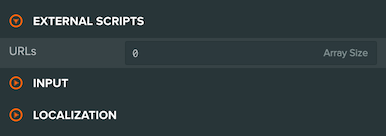
将数量从 0 改为 1,添加来自 CDN 的 Socket.io 库 URL。本例使用原文编写时采用的 4.8.1 版本:
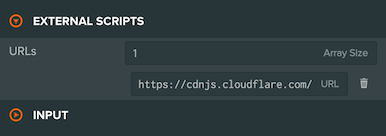
https://cdnjs.cloudflare.com/ajax/libs/socket.io/4.8.1/socket.io.min.js
接着创建 Network.js 处理网络逻辑。在 initialize 中加入以下代码,建立服务器连接:
this.socket = io.connect('https://playcanvas-multiplayer-server.glitch.me');
将 https://playcanvas-multiplayer-server.glitch.me 替换为你自己的服务器地址。
将网络脚本挂到 Root 实体并启动游戏,观察服务器日志。连接成功时,应显示 New client connected: 和客户端 ID。至此,项目可以与服务器收发消息。
服务器与客户端通信
通过之前建立的 socket 连接在客户端和服务器之间传递数据。在 PlayCanvas 的 Network.js 中,使用 emit 发送数据,例如:
this.socket.emit('playerJoined', 'John');
此代码发送名为 playerJoined 的消息,数据为 John。要接收消息,在服务器的 server.js 中加入:
socket.on('playerJoined', function (name) {
    console.log (name);
});
当 playerJoined 发出时,服务器会记录收到的数据。
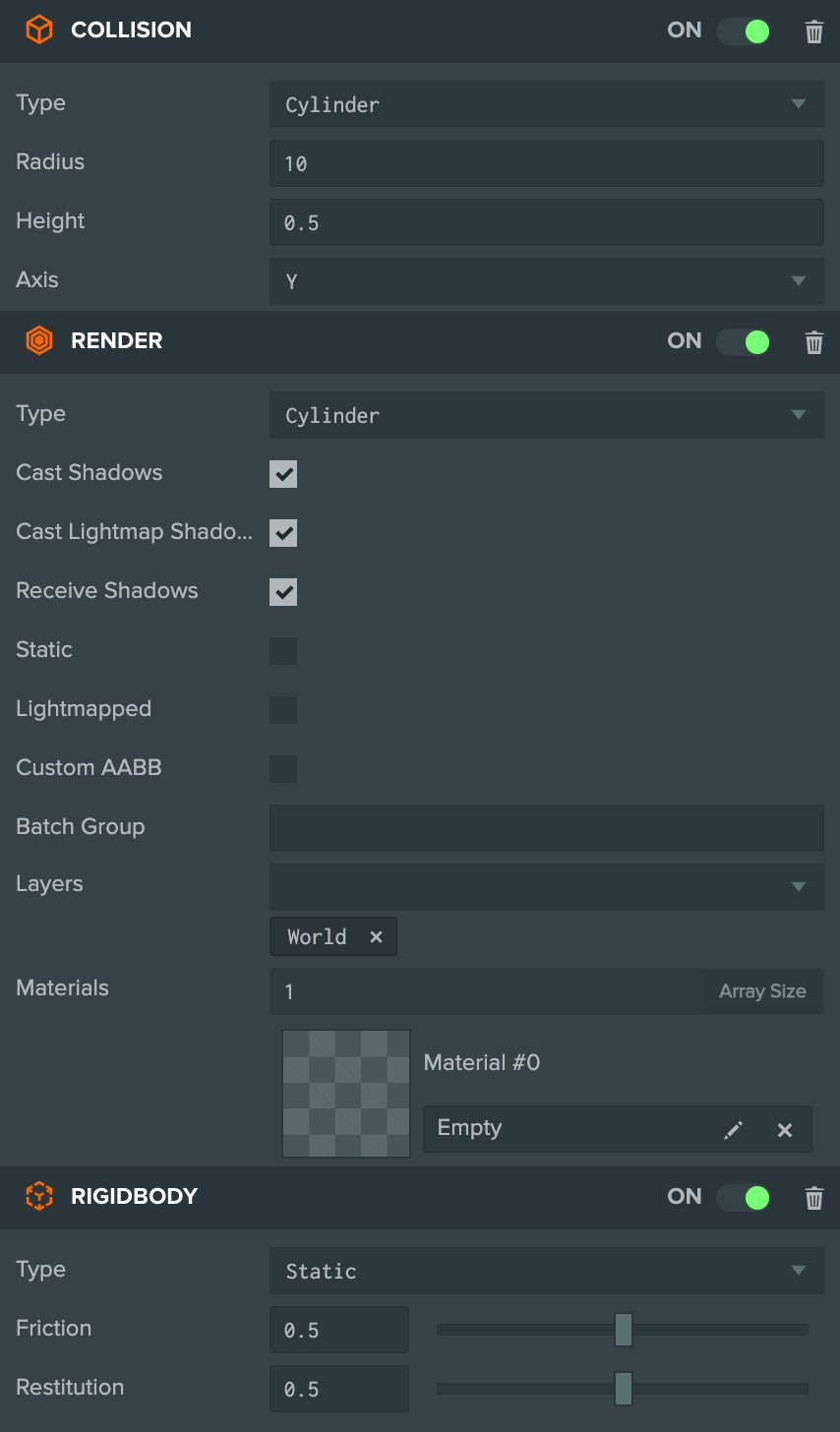
本例的目标是让多个玩家实时共同移动,因此先创建环境。创建地面实体,添加箱形碰撞组件与静态刚体,配置应如下图:
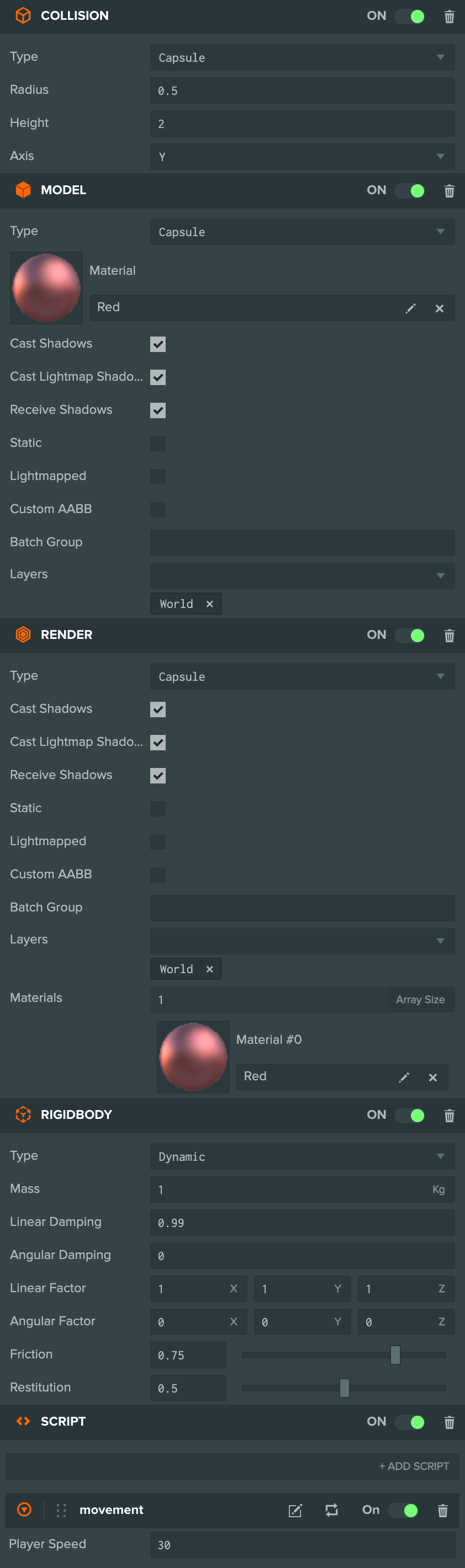
再创建玩家胶囊体,命名为 Player,添加动态刚体和箱形碰撞组件,并按下图调整刚体属性。
复制玩家实体,重命名为 Other,取消勾选 Enabled,使其初始禁用。它将作为游戏中其他玩家的模板。
为玩家添加脚本组件,并挂载新脚本 Movement.js:
- ESM
- 传统脚本
import { Script, Vec3, KEY_A, KEY_D, KEY_W, KEY_S } from 'playcanvas';

export class Movement extends Script {
    static scriptName = "movement";

    /**
     * @attribute
     * @title Player Speed
     * @type {number}
     */
    playerSpeed = 30;

    // initialize code called once per entity
    initialize() {
        this.force = new Vec3();
    }

    // update code called every frame
    update(dt) {
        const forward = this.entity.forward;
        const right = this.entity.right;
        const app = this.app;

        let x = 0;
        let z = 0;

        if (app.keyboard.isPressed(KEY_A)) {
            x -= right.x;
            z -= right.z;
        }

        if (app.keyboard.isPressed(KEY_D)) {
            x += right.x;
            z += right.z;
        }

        if (app.keyboard.isPressed(KEY_W)) {
            x += forward.x;
            z += forward.z;
        }

        if (app.keyboard.isPressed(KEY_S)) {
            x -= forward.x;
            z -= forward.z;
        }

        if (x !== 0 || z !== 0) {
            x *= dt;
            z *= dt;

            this.force.set(x, 0, z).normalize().scale(this.playerSpeed);
            this.entity.rigidbody.applyForce(this.force);
        }
    }
}
var Movement = pc.createScript('movement');

Movement.attributes.add('playerSpeed', {
    type: 'number',
    default: 30,
    title: 'Player Speed'
});

// initialize code called once per entity
Movement.prototype.initialize = function() {
    this.force = new pc.Vec3();
};

// update code called every frame
Movement.prototype.update = function(dt) {
    var forward = this.entity.forward;
    var right = this.entity.right;
    var app = this.app;

    x = 0;
    z = 0;

    if (app.keyboard.isPressed(pc.KEY_A)) {
        x -= right.x;
        z -= right.z;
    }

    if (app.keyboard.isPressed(pc.KEY_D)) {
        x += right.x;
        z += right.z;
    }

    if (app.keyboard.isPressed(pc.KEY_W)) {
        x += forward.x;
        z += forward.z;
    }

    if (app.keyboard.isPressed(pc.KEY_S)) {
        x -= forward.x;
        z -= forward.z;
    }

    if (x !== 0 || z !== 0) {
        x *= dt;
        z *= dt;

        this.force.set (x, 0, z).normalize ().scale ((this.playerSpeed));
        this.entity.rigidbody.applyForce (this.force);
    }
};
启动游戏后,应可使用 WASD 移动玩家。若无效,请检查是否遗漏步骤或实体属性设置错误,也可尝试修改移动脚本的 speed 属性。
为实现实时多人联机,需要跟踪游戏中的所有玩家。将服务器代码替换为:
const http = require('http');
const { Server } = require('socket.io');

/**
 * Class to track each connected player (id + position)
 */
class Player {
    constructor(id) {
        this.id = id;
        this.x = 0;
        this.y = 0;
        this.z = 0;
    }
}

const server = http.createServer();

// Configure Socket.IO with CORS
const io = new Server(server, {
    cors: {
        // If you only want to allow PlayCanvas launch domain:
        // origin: "https://launch.playcanvas.com",

        // Or allow all origins (less secure, but quick for testing)
        origin: "*",
        methods: ["GET", "POST"]
    }
});

const players = {};

/**
 * Handle new socket connections
 */
io.on('connection', (socket) => {
    console.log(`New client connected: ${socket.id}`);

    // Fired when the client is ready to initialize their Player object
    socket.on('initialize', () => {
        const newPlayer = new Player(socket.id);
        players[socket.id] = newPlayer;

        // Send to this client its own ID and the current list of players
        socket.emit('playerData', { id: socket.id, players });

        // Tell everyone else about this new player
        socket.broadcast.emit('playerJoined', newPlayer);
    });
});

const PORT = process.env.PORT || 3000;
server.listen(PORT, () => {
    console.log(`Server started on port ${PORT}`);
});
上述代码在玩家发送 initialize 消息时,返回其唯一 ID 和其他玩家数据,并通知其他人有新玩家加入。接下来将对应逻辑添加到 Network 脚本。
在 initialize 中添加:
// Your io.connect function call should be up here

this.socket.emit('initialize');
var socket = this.socket;

this.player = this.app.root.findByName('Player');
this.other = this.app.root.findByName('Other');

var self = this;
socket.on('playerData', function (data) {
    self.initializePlayers (data);
});

socket.on('playerJoined', function (data) {
    self.addPlayer(data);
});
然后在 Network.js 中声明以下函数:
- ESM
- 传统脚本
    initializePlayers (data) {
        this.players = data.players;
        Network.id = data.id;

        for (let id in this.players) {
            if (id != Network.id) {
                this.players[id].entity = this.createPlayerEntity(this.players[id]);
            }
        }

        this.initialized = true;
        console.log('initialized');
    };

    createPlayerEntity (data) {
        // Create a new player entity
        const newPlayer = this.other.clone();
        newPlayer.enabled = true;

        // Add the entity to the entity hierarchy
        this.other.getParent().addChild(newPlayer);

        // If a location was given, teleport the new entity to the position of the connected player
        if (data)
            newPlayer.rigidbody.teleport(data.x, data.y, data.z);

        return newPlayer;
    };

    addPlayer (data) {
        this.players[data.id] = data;
        this.players[data.id].entity = this.createPlayerEntity(data);
    };
}
Network.prototype.initializePlayers = function (data) {
    this.players = data.players;
    Network.id = data.id;

    for (var id in this.players) {
        if (id != Network.id) {
            this.players[id].entity = this.createPlayerEntity(this.players[id]);
        }
    }

    this.initialized = true;
    console.log('initialized');
};

Network.prototype.createPlayerEntity = function (data) {
    // Create a new player entity
    var newPlayer = this.other.clone();
    newPlayer.enabled = true;

    // Add the entity to the entity hierarchy
    this.other.getParent().addChild(newPlayer);

    // If a location was given, teleport the new entity to the position of the connected player
    if (data)
        newPlayer.rigidbody.teleport(data.x, data.y, data.z);

    return newPlayer;
};

Network.prototype.addPlayer = function (data) {
    this.players[data.id] = data;
    this.players[data.id].entity = this.createPlayerEntity(data);
};
现在加入游戏时,客户端会通知服务器,服务器返回玩家及其位置列表。游戏为每个已连接玩家创建实体并定位。但服务器还不知道所有玩家的实时位置,因此需要每帧发送自身位置。
在 Network.js 的 initialize 中加入:
socket.on('playerMoved', function (data) {
    self.movePlayer(data);
});
将 update 替换为:
Network.prototype.update = function (dt) {
    this.updatePosition();
};
再在 Network.js 中声明以下函数:
- ESM
- 传统脚本
movePlayer(data) {
    if (this.initialized)
        this.players[data.id].entity.rigidbody.teleport (data.x, data.y, data.z);
}

updatePosition() {
    if (this.initialized) {
        const pos = this.player.getPosition();
        this.socket.emit ('positionUpdate', {id: this.id, x: pos.x, y: pos.y, z: pos.z});
    }
}
Network.prototype.movePlayer = function (data) {
    if (this.initialized && !this.players[data.id].deleted) {
        this.players[data.id].entity.rigidbody.teleport(data.x, data.y, data.z);
    }
};

Network.prototype.updatePosition = function () {
    if (this.initialized) {
        var pos = this.player.getPosition();
        Network.socket.emit('positionUpdate', {id: Network.id, x: pos.x, y: pos.y, z: pos.z});
    }
};
回到服务器,添加新事件处理玩家发送的位置:
// Update player position
socket.on('positionUpdate', (data) => {
    if (!players[socket.id]) return;
    players[socket.id].x = data.x;
    players[socket.id].y = data.y;
    players[socket.id].z = data.z;

    // Broadcast updated position to all other players
    socket.broadcast.emit('playerMoved', {
        id: socket.id,
        x: data.x,
        y: data.y,
        z: data.z
    });
});
最后,通过监听 socket 的 disconnect 事件处理玩家断开连接。
// Handle disconnections
socket.on('disconnect', () => {
    console.log(`Client disconnected: ${socket.id}`);
    if (!players[socket.id]) return;
    delete players[socket.id];
    // Notify other players to remove this player
    socket.broadcast.emit('killPlayer', socket.id);
});
最终完整服务器代码如下:
const http = require('http');
const { Server } = require('socket.io');

/**
 * Class to track each connected player (id + position)
 */
class Player {
    constructor(id) {
        this.id = id;
        this.x = 0;
        this.y = 0;
        this.z = 0;
    }
}

const server = http.createServer();

// Configure Socket.IO with CORS
const io = new Server(server, {
    cors: {
        // If you only want to allow PlayCanvas launch domain:
        // origin: "https://launch.playcanvas.com",

        // Or allow all origins (less secure, but quick for testing)
        origin: "*",
        methods: ["GET", "POST"]
    }
});

const players = {};

/**
 * Handle new socket connections
 */
io.on('connection', (socket) => {
    console.log(`New client connected: ${socket.id}`);

    // Fired when the client is ready to initialize their Player object
    socket.on('initialize', () => {
        const newPlayer = new Player(socket.id);
        players[socket.id] = newPlayer;

        // Send to this client its own ID and the current list of players
        socket.emit('playerData', { id: socket.id, players });

        // Tell everyone else about this new player
        socket.broadcast.emit('playerJoined', newPlayer);
    });

    // Update player position
    socket.on('positionUpdate', (data) => {
        if (!players[socket.id]) return;
        players[socket.id].x = data.x;
        players[socket.id].y = data.y;
        players[socket.id].z = data.z;

        // Broadcast updated position to all other players
        socket.broadcast.emit('playerMoved', {
            id: socket.id,
            x: data.x,
            y: data.y,
            z: data.z
        });
    });

    // Handle disconnections
    socket.on('disconnect', () => {
        console.log(`Client disconnected: ${socket.id}`);
        if (!players[socket.id]) return;
        delete players[socket.id];
        // Notify other players to remove this player
        socket.broadcast.emit('killPlayer', socket.id);
    });
});

const PORT = process.env.PORT || 3000;
server.listen(PORT, () => {
    console.log(`Server started on port ${PORT}`);
});
后续练习
基础功能已经完成!可以继续尝试以下想法:
- 玩家关闭游戏后移除其角色。
- 玩家掉出地面边缘时重新生成。
这只是最基础的多人实现。制作较大的多人游戏时,应考虑使用权威服务器,而非让客户端处理全部游戏逻辑。更深入的 Socket.io 与 JavaScript 多人开发教程见此处。
原教程的完整服务器代码位于 Glitch,可作为进一步扩展的参考。