使用 Photon 实现实时多人联机
点击地面移动。
包含匹配功能的完整项目见此处。
许多游戏使用 Photon,其生态中也有 PUN 等方案,并提供适用于 HTML5 游戏的 JavaScript SDK。
原教程介绍的免费额度为最多 20 名同时在线玩家(CCU)。
学习内容
- 如何向 PlayCanvas 添加 Photon SDK。
- 使用 Photon 实现多人联机。
配置
PlayCanvas 项目
首先派生教程项目。
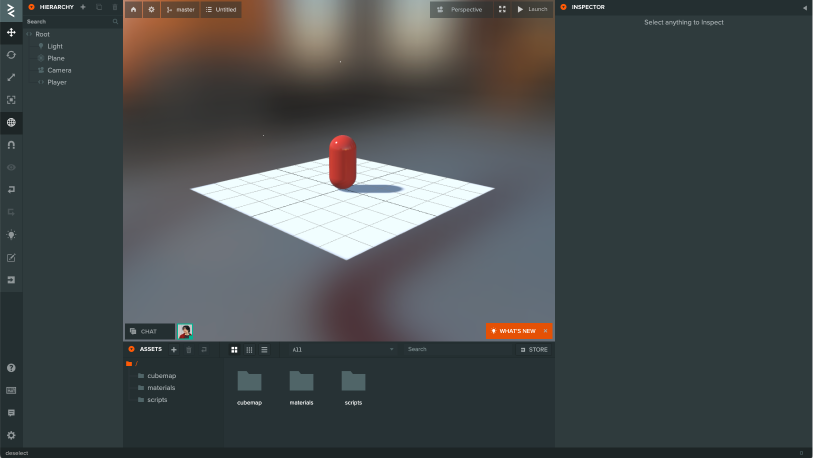
Photon 账户
使用 SDK 和查看文档需要注册账户。
在 Photon Engine 网站创建账户。
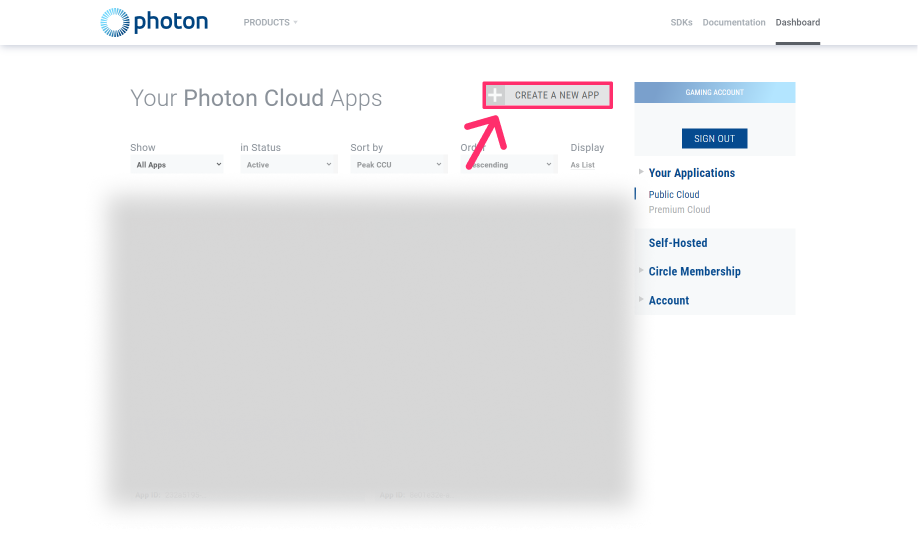
创建新应用
在控制台点击 CREATE NEW APP(创建新应用)。
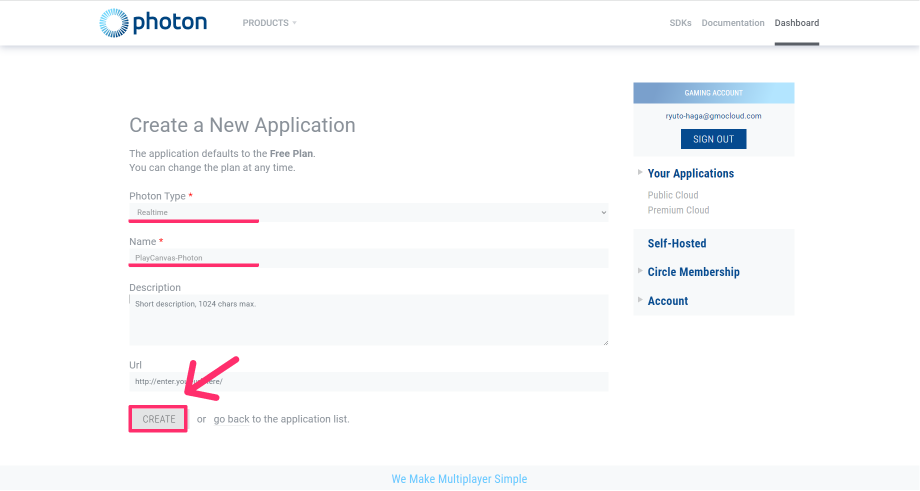
选择 Photon 类型与应用名称
填写以下内容:
- Photon Type:RealTime。
- Name:例如 PlayCanvas-Photon。
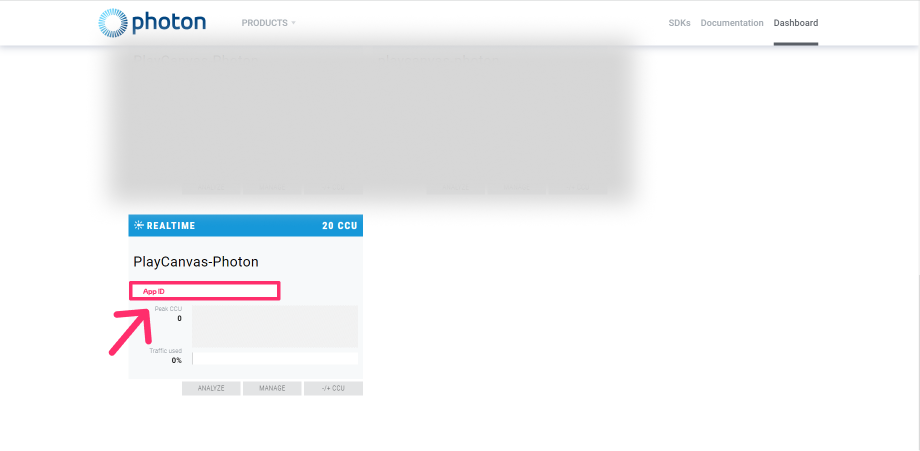
复制 AppID
记下 AppId,稍后将会用到。
下载 SDK
从控制台下载 SDK。
在控制台点击 SDK
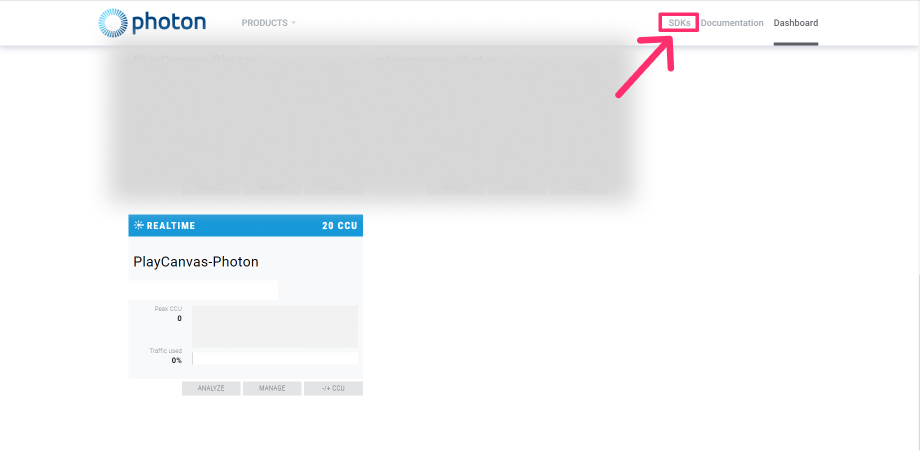
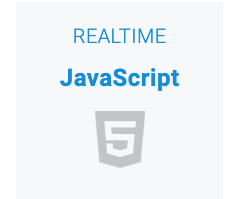
选择 RealTime JavaScript
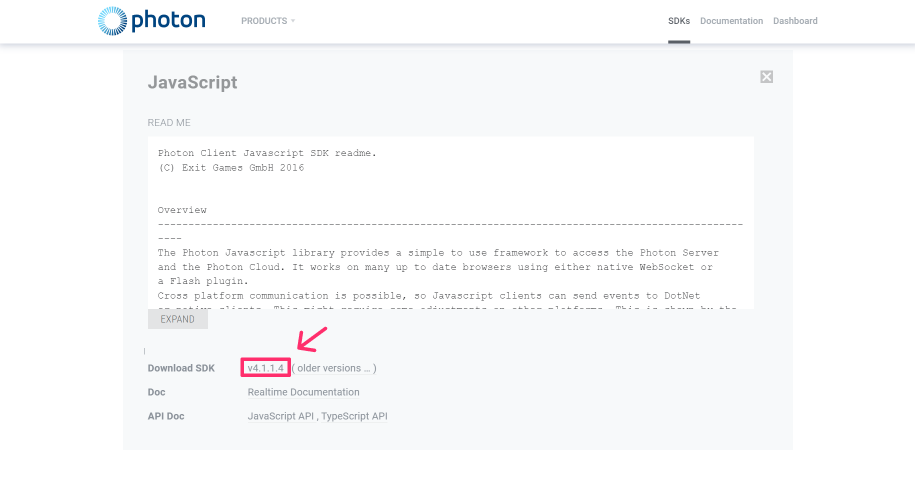
点击 Download SDK
解压 SDK
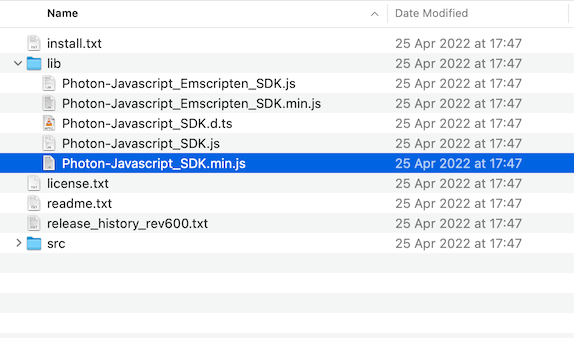
SDK 为 ZIP 文件,解压后打开 photon-javascript-sdk_vX-X-X-X → lib → Photon-Javascript_SDK.min.js。
导入 SDK
将刚下载的 SDK 导入 PlayCanvas 编辑器。
在编辑器中上传 SDK
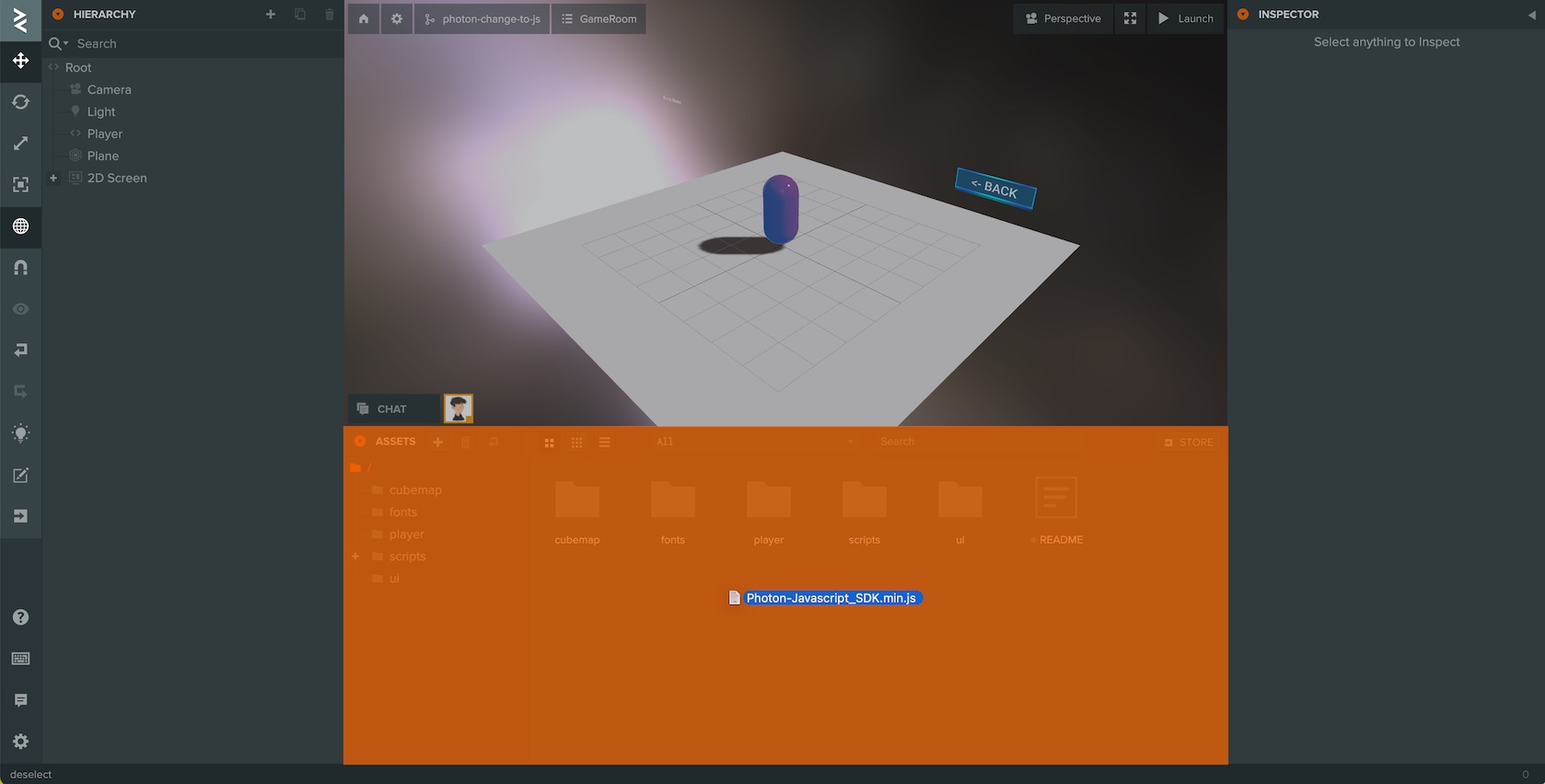
将 SDK 拖到编辑器的资源面板。
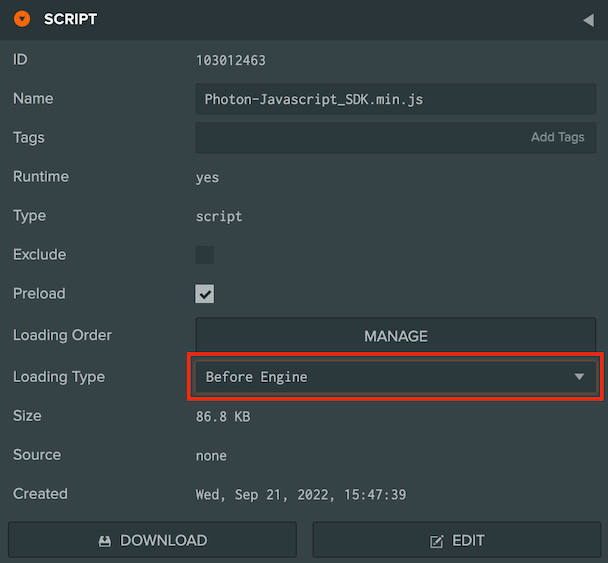
将加载类型从 Asset 改为 Before Engine
实现多人联机
实现包括以下步骤:
- 使用 Photon 类进行实时通信与负载均衡。
- 连接 Photon 主服务器。
- 创建或加入房间。
- 同步其他玩家的操作与移动。
在 PlayCanvas 中使用 Photon
在 PlayCanvas 中实例化 Photon 类
创建名为 photon-loadbalancing-playcanvas.js 的脚本资源,用于初始化 Photon。
- ESM
- 传统脚本
import { Script } from 'playcanvas';

/** @enum {string} */
const Region = {
    "Select Region": "default",
    "Asia, Singapore": "asia",
    "Australia, Melbourne": "au",
    "Canada, East Montreal": "cae",
    "Chinese Mainland (See Instructions) Shanghai": "cn",
    "Europe, Amsterdam": "eu",
    "India, Chennai": "in",
    "Japan, Tokyo": "jp",
    "Russia Moscow": "ru",
    "Russia, East Khabarovsk": "rue",
    "South Africa Johannesburg": "za",
    "South America, Sao Paulo": "sa",
    "South Korea, Seoul": "kr",
    "Turkey Istanbul": "tr",
    "USA, East Washington": "us",
    "USA, West San José": "usw",
}

export class PhotonLoadBalancingPlayCanvas extends Script {
    static scriptName = "photonLoadBalancingPlayCanvas";

    /**
     * @attribute
     * @title App Id
     * @type {string}
     */
    appId = null;

    /**
     * @attribute
     * @title App Version
     * @type {string}
     */
    appVersion = "1.0";

    /**
     * @attribute
     * @title Wss
     * @type {boolean}
     */
    wss = true;

    /**
     * Photon Cloud has servers in several regions, distributed across multiple hosting centers over the world.You can choose optimized region for you.
     *
     * @attribute
     * @type {Region}
     */
    region = Region["Europe, Amsterdam"]

    initialize() {
        // Assuming Photon and its LoadBalancingClient are globally available or imported
        this.loadBalancingClient = new Photon.LoadBalancing.LoadBalancingClient(this.wss ? Photon.LoadBalancing.Constants.ConnectionProtocol.Wss : Photon.LoadBalancing.Constants.ConnectionProtocol.Ws, this.appId, this.appVersion);

        // pc.Application
        this.loadBalancingClient.app = this.app;
    }
}
const PhotonLoadBalancingPlayCanvas = pc.createScript("photonLoadBalancingPlayCanvas");
PhotonLoadBalancingPlayCanvas.attributes.add("appId", { type: "string" });
PhotonLoadBalancingPlayCanvas.attributes.add("appVersion", { type: "string", default: "1.0" });
PhotonLoadBalancingPlayCanvas.attributes.add("wss", { type: "boolean", default: true });
PhotonLoadBalancingPlayCanvas.attributes.add("region", {
    type: "string", default: "jp",
    description: "Photon Cloud has servers in several regions, distributed across multiple hosting centers over the world.You can choose optimized region for you.",
    enum: [
        { "Select Region": "default" },
        { "Asia, Singapore": "asia" },
        { "Australia, Melbourne": "au" },
        { "Canada, East Montreal": "cae" },
        { "Chinese Mainland (See Instructions) Shanghai": "cn" },
        { "Europe, Amsterdam": "eu" },
        { "India, Chennai": "in" },
        { "Japan, Tokyo": "jp" },
        { "Russia Moscow": "ru" },
        { "Russia, East Khabarovsk": "rue" },
        { "South Africa Johannesburg": "za" },
        { "South America, Sao Paulo": "sa" },
        { "South Korea, Seoul": "kr" },
        { "Turkey Istanbul": "tr" },
        { "USA, East Washington": "us" },
        { "USA, West San José": "usw" },
    ],
});

PhotonLoadBalancingPlayCanvas.prototype.initialize = function () {

    // Photon Settings
    this.loadBalancingClient = new Photon.LoadBalancing.LoadBalancingClient(this.wss ? 1 : 0, this.appId, this.appVersion);

    // pc.Application
    this.loadBalancingClient.app = this.app;
};
- Photon.LoadBalancing.LoadBalancingClient:包含 Photon SDK 实时通信的许多功能。
为 Root 实体设置脚本
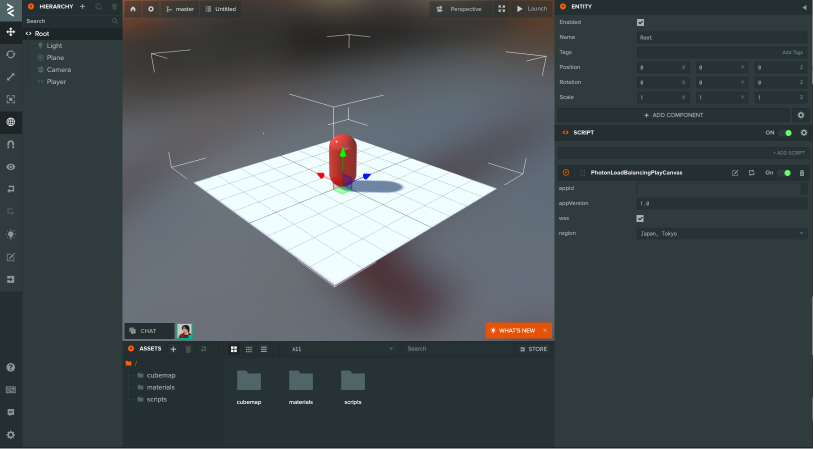
在编辑器中将新建的 photon-loadbalancing-playcanvas.js 脚本挂到 Root 实体。
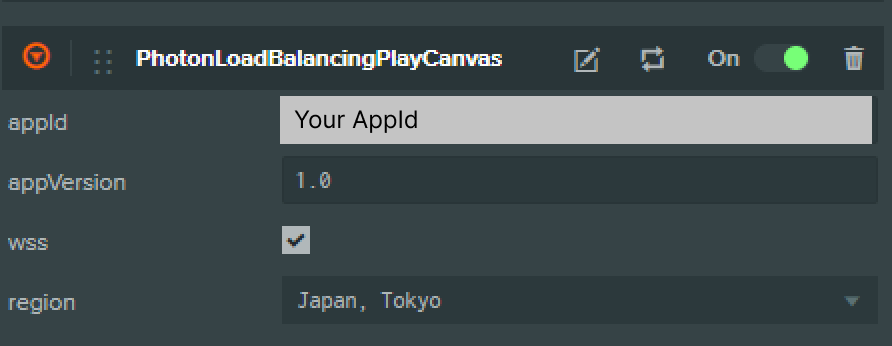
将 AppId 粘贴到脚本属性
在脚本属性中输入 AppId。
this.loadBalancingClient = new Photon.LoadBalancing.LoadBalancingClient( this.wss ? 1 : 0, this.appId, this.appVersion );
- wss:通过 WebSocket 建立安全连接。
- appId:应用标识符。
- appVersion:用于版本区分,不同版本不能互相连接。
连接 Photon 主服务器
使用 connectToRegionMaster 连接主服务器
- ESM
- 传统脚本
initialize () {

    // Photon Settings
    this.loadBalancingClient = new Photon.LoadBalancing.LoadBalancingClient(this.wss ? 1 : 0, this.appId, this.appVersion);

    // pc.Application
    this.loadBalancingClient.app = this.app;

    // Connect to the master server
    if (!this.loadBalancingClient.isInLobby()) {
        this.loadBalancingClient.connectToRegionMaster(this.region);
    }
}
PhotonLoadBalancingPlayCanvas.prototype.initialize = function () {

    // Photon Settings
    this.loadBalancingClient = new Photon.LoadBalancing.LoadBalancingClient(this.wss ? 1 : 0, this.appId, this.appVersion);

    // pc.Application
    this.loadBalancingClient.app = this.app;

    // Connect to the master server
    if (!this.loadBalancingClient.isInLobby()) {
        this.loadBalancingClient.connectToRegionMaster(this.region);
    }
};
- connectToRegionMaster:连接指定区域的主服务器。
- this.region:配置区域。
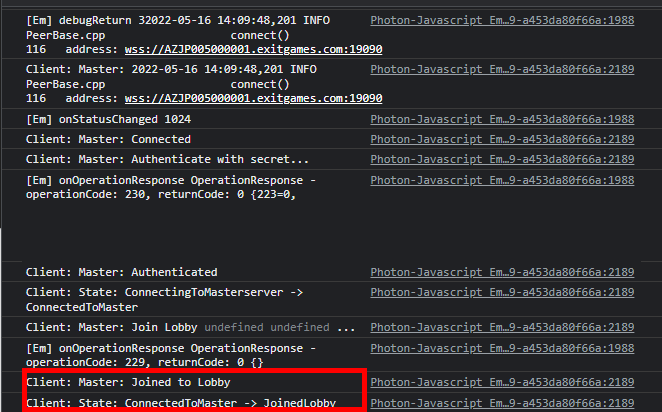
调用 connectToRegionMaster 成功连接大厅后,日志会显示 JoinedLobby。
创建或加入房间
连接大厅时调用 onRoomList。
使用 joinRandomOrCreateRoom 随机加入可用房间,没有合适房间时创建新房间。
- ESM
- 传统脚本
initialize() {

    // Photon Settings
    this.loadBalancingClient = new Photon.LoadBalancing.LoadBalancingClient(this.wss ? 1 : 0, this.appId, this.appVersion);

    // pc.Application
    this.loadBalancingClient.app = this.app;

    // Connect to the master server
    if (!this.loadBalancingClient.isInLobby()) {
        this.loadBalancingClient.connectToRegionMaster(this.region);
    }

    // Added
    this.loadBalancingClient.onRoomList = this.onRoomList;
    this.loadBalancingClient.onJoinRoom = this.onJoinRoom;
}

onRoomList() {
    this.joinRandomOrCreateRoom();
}

onJoinRoom(createdByMe) {
    console.log("Joined the room.");
}
PhotonLoadBalancingPlayCanvas.prototype.initialize = function () {

    // Photon Settings
    this.loadBalancingClient = new Photon.LoadBalancing.LoadBalancingClient(this.wss ? 1 : 0, this.appId, this.appVersion);

    // pc.Application
    this.loadBalancingClient.app = this.app;

    // Connect to the master server
    if (!this.loadBalancingClient.isInLobby()) {
        this.loadBalancingClient.connectToRegionMaster(this.region);
    }

    // Added
    this.loadBalancingClient.onRoomList = this.onRoomList;
    this.loadBalancingClient.onJoinRoom = this.onJoinRoom;
};

PhotonLoadBalancingPlayCanvas.prototype.onRoomList = function () {
    this.joinRandomOrCreateRoom();
};

PhotonLoadBalancingPlayCanvas.prototype.onJoinRoom = function (createdByMe) {
    console.log("Joined the room.");
};
- onRoomList(rooms):接收大厅中的房间列表。
- joinRandomOrCreateRoom(options, createRoomName, createOptions):随机加入房间,如果不存在则创建新房间。
- onJoinRoom:加入房间后调用。
加入与离开
玩家加入房间时,需要与其他玩家同步。 使用 onActorJoin 和 onActorLeave。
PhotonLoadBalancingPlayCanvas.prototype.initialize = function () {

    // Photon Settings
    this.loadBalancingClient = new Photon.LoadBalancing.LoadBalancingClient(this.wss ? 1 : 0, this.appId, this.appVersion);

    // pc.Application
    this.loadBalancingClient.app = this.app;

    // Connect to the master server
    if (!this.loadBalancingClient.isInLobby()) {
        this.loadBalancingClient.connectToRegionMaster(this.region);
    }

    this.loadBalancingClient.onRoomList = this.onRoomList;
    this.loadBalancingClient.onJoinRoom = this.onJoinRoom;

    // Added
    this.loadBalancingClient.onActorJoin = this.onActorJoin;
    this.loadBalancingClient.onActorLeave = this.onActorLeave;
};

PhotonLoadBalancingPlayCanvas.prototype.onRoomList = function () {
    this.joinRandomOrCreateRoom();
};

PhotonLoadBalancingPlayCanvas.prototype.onJoinRoom = function (createdByMe) {
    console.log("Joined the room.");
};

PhotonLoadBalancingPlayCanvas.prototype.onActorJoin = function (actor) {
    const { actorNr } = actor;
    if (actor.isLocal) return;
    const otherPlayer = new pc.Entity();
    otherPlayer.addComponent("render", { type: "capsule" });
    otherPlayer.setLocalPosition(0, 1, 0);
    otherPlayer.name = actorNr;
    this.app.root.children[0].addChild(otherPlayer);
};

PhotonLoadBalancingPlayCanvas.prototype.onActorLeave = function (actor) {
    const { actorNr } = actor;
    const otherPlayer = this.app.root.children[0].findByName(actorNr);
    if (actor.isLocal || !otherPlayer) return;
    otherPlayer.destroy();
};

- actor 包含
name、actorNr、isLocal和userId。 - onActorJoin:新用户连接时,获取加入的参与者。
- onActorLeave:用户断开时,获取离开的参与者。
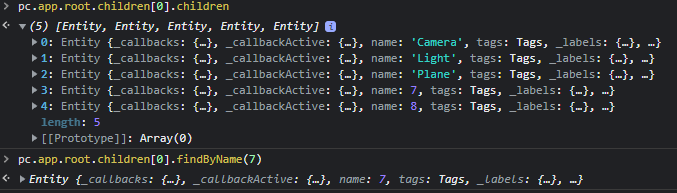
成功后,玩家加入时会添加对应实体。
玩家移动
创建 player.js,处理角色移动。
- ESM
- 传统脚本
import { Script, Vec3, KEY_LEFT, KEY_RIGHT, KEY_UP, KEY_DOWN } from 'playcanvas';

export class Movement extends Script {
    static scriptName = "movement";

    update (dt) {
        const pos = new Vec3(0, 0, 0);
        if (this.app.keyboard.isPressed(KEY_LEFT)) {
            pos.x = -dt;
        }
        if (this.app.keyboard.isPressed(KEY_RIGHT)) {
            pos.x = dt;
        }
        if (this.app.keyboard.isPressed(KEY_UP)) {
            pos.z = -dt;
        }
        if (this.app.keyboard.isPressed(KEY_DOWN)) {
            pos.z = dt;
        }
        if (!pos.equals(new Vec3(0, 0, 0))) {
            this.entity.translate(pos);
        }
    }
}
const Player = pc.createScript("player");

Player.prototype.update = function (dt) {
    const pos = new pc.Vec3(0, 0, 0);
    if (this.app.keyboard.isPressed(pc.KEY_LEFT)) {
        pos.x = -dt;
    }
    if (this.app.keyboard.isPressed(pc.KEY_RIGHT)) {
        pos.x = dt;
    }
    if (this.app.keyboard.isPressed(pc.KEY_UP)) {
        pos.z = -dt;
    }
    if (this.app.keyboard.isPressed(pc.KEY_DOWN)) {
        pos.z = dt;
    }
    if (!pos.equals(new pc.Vec3(0, 0, 0))) {
        this.entity.translate(pos);
    }
};
- this.app.keyboard.isPressed:检查按键是否按下。
同步其他玩家
通过 raiseEvent 和 onEvent 同步玩家位置。
使用 raiseEvent 同步位置
- ESM
- 传统脚本
import { Script, Entity } from 'playcanvas';

/** @enum {string} */
const Region = {
    "Select Region": "default",
    "Asia, Singapore": "asia",
    "Australia, Melbourne": "au",
    "Canada, East Montreal": "cae",
    "Chinese Mainland (See Instructions) Shanghai": "cn",
    "Europe, Amsterdam": "eu",
    "India, Chennai": "in",
    "Japan, Tokyo": "jp",
    "Russia Moscow": "ru",
    "Russia, East Khabarovsk": "rue",
    "South Africa Johannesburg": "za",
    "South America, Sao Paulo": "sa",
    "South Korea, Seoul": "kr",
    "Turkey Istanbul": "tr",
    "USA, East Washington": "us",
    "USA, West San José": "usw",
}

export class PhotonLoadBalancingPlayCanvas extends Script {
    static scriptName = "photonLoadBalancingPlayCanvas";

    /**
     * @attribute
     * @title App Id
     * @type {string}
     */
    appId = null;

    /**
     * @attribute
     * @title App Version
     * @type {string}
     */
    appVersion = "1.0";

    /**
     * @attribute
     * @title Wss
     * @type {boolean}
     */
    wss = true;

    /**
     * Photon Cloud has servers in several regions, distributed across multiple hosting centers over the world.You can choose optimized region for you.
     *
     * @attribute
     * @type {Region}
     */
    region = Region["Europe, Amsterdam"]

    initialize() {
        // Assuming Photon and its LoadBalancingClient are globally available or correctly imported
        this.loadBalancingClient = new Photon.LoadBalancing.LoadBalancingClient(this.wss ? Photon.LoadBalancing.Constants.ConnectionProtocol.Wss : Photon.LoadBalancing.Constants.ConnectionProtocol.Ws, this.appId, this.appVersion);

        this.loadBalancingClient.app = this.app;

        if (!this.loadBalancingClient.isInLobby()) {
            this.loadBalancingClient.connectToRegionMaster(this.region);
        }
        this.loadBalancingClient.onRoomList = this.onRoomList.bind(this);
        this.loadBalancingClient.onJoinRoom = this.onJoinRoom.bind(this);
        this.loadBalancingClient.onActorJoin = this.onActorJoin.bind(this);
        this.loadBalancingClient.onActorLeave = this.onActorLeave.bind(this);

        this.loadBalancingClient.onEvent = this.onEvent.bind(this);
        this.app.on("createOtherPlayerEntity", this.createOtherPlayerEntity, this);
        this.app.on("loadbalancing:sendPlayerPosition", this.sendPlayerPosition, this);
    }

    onRoomList() {
        this.joinRandomOrCreateRoom();
    }

    onJoinRoom(createdByMe) {
        this.myRoomActorsArray().forEach((actor) => {
            if (actor.isLocal) return;
            this.app.fire("createOtherPlayerEntity", actor);
        });
    }

    onActorJoin(actor) {
        if (actor.isLocal) return;
        this.app.fire("createOtherPlayerEntity", actor);
        const { x, y, z } = this.app.root.findByName("Player").getLocalPosition();
        this.app.fire("loadbalancing:sendPlayerPosition", { x, y, z });
    }

    onActorLeave(actor) {
        const { actorNr } = actor;
        const otherPlayer = this.app.root.findByName(actorNr);
        if (actor.isLocal || !otherPlayer) return;
        otherPlayer.destroy();
    }

    createOtherPlayerEntity(actor) {
        const { actorNr } = actor;
        const entity = new Entity();
        entity.addComponent("render", { type: "capsule" });
        entity.setLocalPosition(0, 1, 0);
        entity.name = actorNr;
        this.app.root.children[0].addChild(entity);
    }

    sendPlayerPosition(position) {
        this.loadBalancingClient.raiseEvent(1, { position });
    }

    onEvent(code, content, actorNr) {
        switch (code) {
            case 1: {
                const otherPlayer = this.app.root.findByName(actorNr);
                if (otherPlayer) {
                    const { x, y, z } = content.position;
                    otherPlayer.setLocalPosition(x, y, z);
                }
                break;
            }
            default:
        }
    }
}
const PhotonLoadBalancingPlayCanvas = pc.createScript("photonLoadBalancingPlayCanvas");
PhotonLoadBalancingPlayCanvas.attributes.add("appId", { type: "string" });
PhotonLoadBalancingPlayCanvas.attributes.add("appVersion", {
    type: "string",
    default: "1.0",
});
PhotonLoadBalancingPlayCanvas.attributes.add("wss", {
    type: "boolean",
    default: true,
});
PhotonLoadBalancingPlayCanvas.attributes.add("region", {
    type: "string",
    default: "jp",
    description:
        "Photon Cloud has servers in several regions, distributed across multiple hosting centers over the world.You can choose optimized region for you.",
    enum: [
        { "Select Region": "default" },
        { "Asia, Singapore": "asia" },
        { "Australia, Melbourne": "au" },
        { "Canada, East Montreal": "cae" },
        { "Chinese Mainland (See Instructions) Shanghai": "cn" },
        { "Europe, Amsterdam": "eu" },
        { "India, Chennai": "in" },
        { "Japan, Tokyo": "jp" },
        { "Russia Moscow": "ru" },
        { "Russia, East Khabarovsk": "rue" },
        { "South Africa Johannesburg": "za" },
        { "South America, Sao Paulo": "sa" },
        { "South Korea, Seoul": "kr" },
        { "Turkey Istanbul": "tr" },
        { "USA, East Washington": "us" },
        { "USA, West San José": "usw" },
    ],
});

PhotonLoadBalancingPlayCanvas.prototype.initialize = function () {

    // Photon Settings
    this.loadBalancingClient = new Photon.LoadBalancing.LoadBalancingClient(this.wss ? 1 : 0, this.appId, this.appVersion);

    // pc.Application
    this.loadBalancingClient.app = this.app;

    // Connect to the master server
    if (!this.loadBalancingClient.isInLobby()) {
        this.loadBalancingClient.connectToRegionMaster(this.region);
    }
    this.loadBalancingClient.onRoomList = this.onRoomList;
    this.loadBalancingClient.onJoinRoom = this.onJoinRoom;
    this.loadBalancingClient.onActorJoin = this.onActorJoin;
    this.loadBalancingClient.onActorLeave = this.onActorLeave;

    // Added
    this.loadBalancingClient.onEvent = this.onEvent;
    this.app.on("createOtherPlayerEntity", this.createOtherPlayerEntity, this);
    this.app.on("loadbalancing:sendPlayerPosition", this.sendPlayerPosition, this);
};

PhotonLoadBalancingPlayCanvas.prototype.onRoomList = function () {
    this.joinRandomOrCreateRoom();
};

PhotonLoadBalancingPlayCanvas.prototype.onJoinRoom = function (createdByMe) {
    this.myRoomActorsArray().forEach((actor) => {
        if (actor.isLocal) return;
        this.app.fire("createOtherPlayerEntity", actor);
    });
};

PhotonLoadBalancingPlayCanvas.prototype.onActorJoin = function (actor) {
    if (actor.isLocal) return;
    this.app.fire("createOtherPlayerEntity", actor);
    const { x, y, z } = this.app.root.findByName("Player").getLocalPosition();
    this.app.fire("loadbalancing:sendPlayerPosition", { x, y, z });
};

PhotonLoadBalancingPlayCanvas.prototype.onActorLeave = function (actor) {
    const { actorNr } = actor;
    const otherPlayer = this.app.root.findByName(actorNr);
    if (actor.isLocal || !otherPlayer) return;
    otherPlayer.destroy();
};

PhotonLoadBalancingPlayCanvas.prototype.createOtherPlayerEntity = function (actor) {
    const { actorNr } = actor;
    const entity = new pc.Entity();
    entity.addComponent("render", { type: "capsule" });
    entity.setLocalPosition(0, 1, 0);
    entity.name = actorNr;
    this.app.root.children[0].addChild(entity);
};

PhotonLoadBalancingPlayCanvas.prototype.sendPlayerPosition = function (position) {
    this.loadBalancingClient.raiseEvent(1, { position });
};

PhotonLoadBalancingPlayCanvas.prototype.onEvent = function (code, content, actorNr) {
    switch (code) {
        case 1: {
            const otherPlayer = this.app.root.findByName(actorNr);
            if (otherPlayer) {
                const { x, y, z } = content.position;
                otherPlayer.setLocalPosition(x, y, z);
            }
            break;
        }
        default:
    }
};
- raiseEvent(eventCode,data, options):发送
eventCode与data。 - onEvent(code, content, actorNr):接收数据,包括
actorNr和事件代码。
改为玩家移动时触发事件
- ESM
- 传统脚本
import { Script, Vec3, KEY_LEFT, KEY_RIGHT, KEY_UP, KEY_DOWN } from 'playcanvas';

export class Player extends Script {
    static scriptName = "player";

    update(dt) {
        const pos = new Vec3(0, 0, 0);
        if (this.app.keyboard.isPressed(KEY_LEFT)) {
            pos.x = -dt;
        }
        if (this.app.keyboard.isPressed(KEY_RIGHT)) {
            pos.x = dt;
        }
        if (this.app.keyboard.isPressed(KEY_UP)) {
            pos.z = -dt;
        }
        if (this.app.keyboard.isPressed(KEY_DOWN)) {
            pos.z = dt;
        }
        if (!pos.equals(new Vec3(0, 0, 0))) {
            this.entity.translate(pos);

            // Added
            const { x, y, z } = this.entity.getPosition();
            this.app.fire("loadbalancing:sendPlayerPosition", { x, y, z });
        }
    }
}
const Player = pc.createScript("player");

Player.prototype.update = function (dt) {
    const pos = new pc.Vec3(0, 0, 0);
    if (this.app.keyboard.isPressed(pc.KEY_LEFT)) {
        pos.x = -dt;
    }
    if (this.app.keyboard.isPressed(pc.KEY_RIGHT)) {
        pos.x = dt;
    }
    if (this.app.keyboard.isPressed(pc.KEY_UP)) {
        pos.z = -dt;
    }
    if (this.app.keyboard.isPressed(pc.KEY_DOWN)) {
        pos.z = dt;
    }
    if (!pos.equals(new pc.Vec3(0, 0, 0))) {
        this.entity.translate(pos);

        // Added
        const { x, y, z } = this.entity.getPosition();
        this.app.fire("loadbalancing:sendPlayerPosition", { x, y, z });
    }
};
- this.app.fire:实现脚本间通信。
完成
现在可以通过 Photon 进行多人游戏!
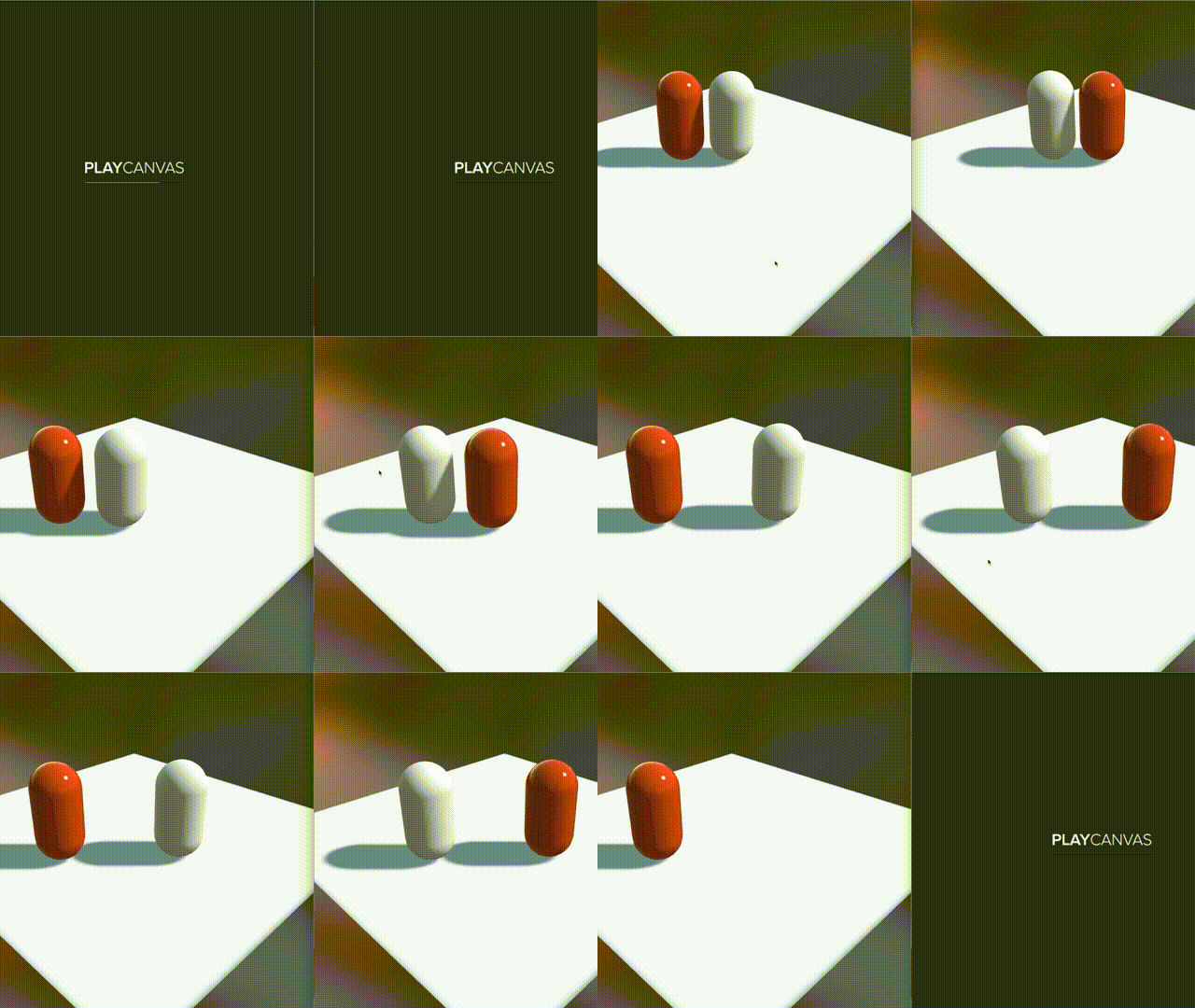
你已能使用 Photon 创建房间,并在玩家之间同步位置。
虽然本项目仅演示玩家间的基本实时通信,但也可以添加匹配功能。包含房间创建与房间列表的完整项目见此处。