操作实体
本教程介绍如何修改实体的位置、朝向和缩放。
实体是大多数 PlayCanvas 框架应用的基础。实体可以表示玩家角色、子弹、敌人,也可以只是空间中的一个点。
实体是一种特殊的图节点,其许多行为继承自 pc.GraphNode。下文的所有操作也适用于图节点。
修改变换矩阵是最常见的实体操作之一。实体的局部变换决定其位置、朝向和缩放,并影响所有子实体。掌握变换操作,是制作有趣交互应用的基础。
局部坐标与世界坐标
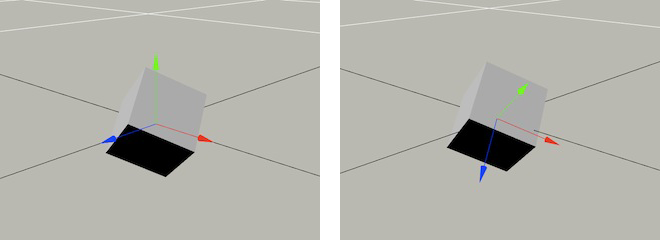
要理解如何移动和操作实体,首先需要理解局部坐标系与世界坐标系。所有实体共享世界坐标系,其原点固定为 (0,0,0),朝向固定,其中 (0,1,0) 表示向上。局部坐标系则相对于实体自身:原点是实体的位置,坐标轴方向随实体朝向变化。
下图展示了实体的世界空间坐标系(左)和局部空间坐标系(右):
层级
实体图或层级也是实体系统的重要概念。实体属于图节点,以父子关系组成图或层级。每个实体最多有一个父级,可以有多个子级。子实体继承父级的变换信息,其世界变换矩阵由父实体的世界变换乘以自身的局部变换得到。例如,子实体的局部平移为 (1,0,0),父实体的局部平移为 (0,1,0),则子实体的世界位置为 (1,1,0)。
位置
获取实体位置非常简单:
// Get the entity's position relative to the coordinate system of the entity's parent
var lp = entity.getLocalPosition();

// Get the entity's position in world space
var wp = entity.getPosition();
这两个方法均返回 pc.Vec3,即以 [x,y,z] 形式表示的向量。
设置实体位置同样简单:
// Set the entity's position relative to the coordinate system of the entity's parent
entity.setLocalPosition(x, y, z);

// Set the entity's position in world space
entity.setPosition(x, y, z);
移动实体
要移动实体,可以为其位置增加偏移,也可以使用辅助函数 translate 和 translateLocal。
// Translate the entity 1 unit down the positive x axis of world space
entity.translate(1, 0, 0);

// Translate the entity 1 unit down the entity's local z axis
entity.translateLocal(0, 0, 1);
朝向
设置实体朝向时,可以设置绝对旋转,也可以应用增量旋转。
绝对旋转既可使用欧拉角,也可使用四元数。维基百科对这两种旋转数学表示的解释稍显复杂,但基本概念很容易理解。关键点如下:
欧拉角
- 欧拉角以度为单位,依次表示绕坐标系 X、Y、Z 轴的三次旋转。
- 沿坐标轴观察时,正欧拉角表示绕该轴逆时针旋转。
- 欧拉角便于理解,因为可以在脑海中直观想象其效果。
四元数
- 四元数由 4 个数值存储,可以表示三维空间中的任意朝向。
- 四元数不便直接设置,但可以从欧拉角、旋转矩阵或轴角表示转换得到。
- 四元数虽然难以直观想象,却很实用,因为它稳定可靠,并且能快速插值,适合旋转动画。
编写实体脚本时,通常会使用欧拉角设置旋转。例如:
// Rotate 30 degrees anticlockwise around the x axis of the parent entity's coordinate
// system and then 45 degrees around its y axis and lastly 60 degrees around its z axis
entity.setLocalEulerAngles(30, 45, 60);

// Rotate 30 degrees anticlockwise around the world space x axis and then 45 degrees
// around the world space y axis and lastly 60 degrees around the world space z axis
entity.setEulerAngles(30, 45, 60);
如果希望以四元数形式设置实体旋转,可使用以下函数:
// Create an identity rotation
var q = new pc.Quat();
// Set the entity to have the same rotation as its parent - equivalent to
// entity.setLocalEulerAngles(0, 0, 0)
entity.setLocalRotation(q);

// Set the entity to have no rotation with respect to the world space coordinate
// system  - equivalent to entity.setEulerAngles(0, 0, 0)
entity.setRotation(q);
要对实体应用增量旋转,可以使用 rotate 绕世界空间坐标轴旋转,或使用 rotateLocal 绕实体当前的局部坐标轴旋转。
例如,让实体绕世界向上轴旋转 180 度:
entity.rotate(0, 180, 0);
或者,让实体绕自身局部 X 轴旋转 90 度:
entity.rotateLocal(90, 0, 0);
缩放
缩放实体只需调用以下函数:
// Scale the entity by a factor of 2 in the local Y axis
entity.setLocalScale(1, 2, 1);
下面是一个稍复杂的示例:
// Scale the entity using a sine function over time
this.timer += deltaTime;
var s = Math.sin(this.timer) + 1;
entity.setLocalScale(s, s, s);
注意,目前不能直接在世界空间中设置实体缩放。