动画混合
注意
本教程使用已弃用的 Model 和 Animation 组件。请改为参考 Anim 状态图混合教程。
信息
点击画面获取焦点,然后按 P 键混合到出拳动画。
本教程介绍动画混合的基础知识。
场景中的对象可能需要动画,机器和角色就是常见例子。制作三维内容时,通常会分别创建各段动画;由于它们经常循环播放,也称为动画循环。例如,人形角色可能具有待机、行走、奔跑等循环动画。在 PlayCanvas 中,需要一种机制将这些动画应用到对象上,并避免切换时突然跳变。动画混合可以让两段动画平滑过渡,显著提升动画对象的视觉品质。
下面看看如何通过 PlayCanvas 实现。
Animation 组件
要将动画应用到模型,需要为实体添加 Animation 组件。下面是蒙皮角色在 PlayCanvas 编辑器中的配置。
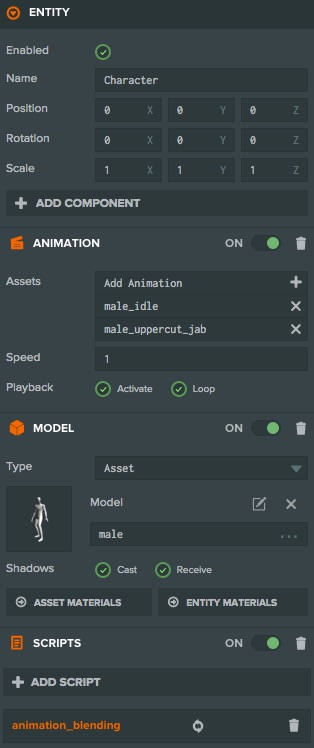
图中的检查器显示了 Animation 组件,其中指定了 idle(待机)和 punch(出拳)两个动画资源。这样配置后,第一个动画 idle 会开始播放,由于启用了循环选项,它将一直循环。但我们希望实现更有趣的行为:
- 循环播放待机动画。
- 按下按键时,混合到循环出拳动画。
- 松开按键时,混合回待机动画。
这些功能超出了 Animation 组件自身的能力,需要 Script 组件补充行为。上方编辑器截图中的蒙皮角色实体具有脚本组件,引用名为 animation_blending.js 的 JavaScript 文件,内容如下:
- ESM
- 传统脚本
import { Script, KEY_P } from 'playcanvas';

export class AnimationBlending extends Script {
    static scriptName = 'animationBlending';

    static states = {
        idle: {
            animation: 'male.json'
        },
        punch: {
            animation: 'male_uppercut_jab.json'
        }
    }

    // initialize code called once per entity
    initialize() {
        this.blendTime = 0.2;

        this.setState('idle');
    };

    update(dt) {
        if (this.app.keyboard.wasPressed(KEY_P)) {
            this.setState('punch');
        }

        if (this.app.keyboard.wasReleased(KEY_P)) {
            this.setState('idle');
        }
    };

    setState(state) {
        const states = AnimationBlending.states;

        this.state = state;
        // Set the current animation, taking 0.2 seconds to blend from
        // the current animation state to the start of the target animation.
        this.entity.animation.play(states[state].animation, this.blendTime);
    };
}
var AnimationBlending = pc.createScript('animationBlending');

AnimationBlending.states = {
    idle: {
        animation: 'male.json'
    },
    punch: {
        animation: 'male_uppercut_jab.json'
    }
};

// initialize code called once per entity
AnimationBlending.prototype.initialize = function() {
    this.blendTime = 0.2;

    this.setState('idle');
};

AnimationBlending.prototype.update = function(dt) {
    if (this.app.keyboard.wasPressed(pc.KEY_P)) {
        this.setState('punch');
    }

    if (this.app.keyboard.wasReleased(pc.KEY_P)) {
        this.setState('idle');
    }
};

AnimationBlending.prototype.setState = function (state) {
    var states = AnimationBlending.states;

    this.state = state;
    // Set the current animation, taking 0.2 seconds to blend from
    // the current animation state to the start of the target animation.
    this.entity.animation.play(states[state].animation, this.blendTime);
};
在此基础上,可以继续向 Animation 组件添加更多动画,并通过脚本构建复杂的动画状态转换。